Templates · Booking and checkout screens · Fitness app · Level
Level Refill screen
A checkout screen from Level, a glucose monitor companion app template in a Clinical style. Screen 20 of 25.
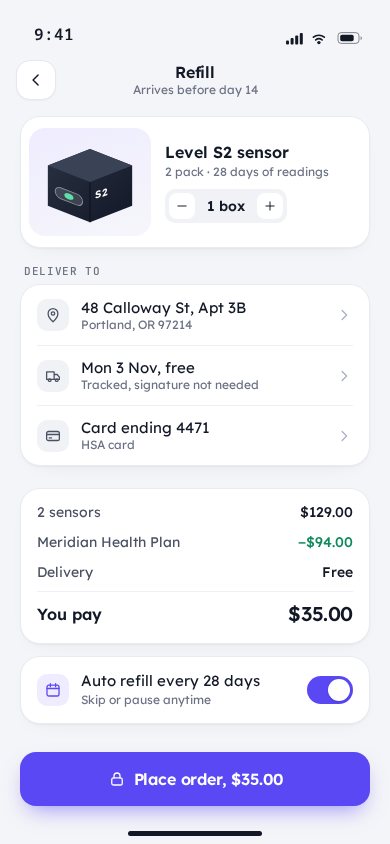
Level is a complete companion for a continuous glucose monitor: welcome, sign in, sensor pairing and target range setup, a today screen with the live reading in the level vial, a 24 hour graph, a single reading, logging carbs, insulin and exercise, a meal camera, a meal's glucose response, food search, the logbook, an urgent low alert, alert settings, 14 day insights with an ambulatory glucose profile, time in range, sensor life, a care team, a clinic report, a sensor refill checkout with confirmation, Level Plus, notifications, profile and settings. Cool white and ink navy with signal violet, range green, amber for highs and coral red for lows.
| Detail | Value |
|---|---|
| Screen type | Checkout |
| App | Level: Glucose monitor companion |
| Category | Health and fitness |
| Design language | Clinical, light |
| Type | JetBrains Mono for headings, Lexend for text |
| Colours | #f4f5f8 background, #ffffff surface, #121826 text, #6b7285 text-muted, #5a48f5 accent, #ffffff accent-contrast, #19b57c secondary, #e6e8ef border, #ef4a5a danger |
What this screen says
- RefillArrives before day 14
- Level S2 sensor
- 2 pack · 28 days of readings 1 box
- Deliver to
- 48 Calloway St, Apt 3BPortland, OR 97214
- Mon 3 Nov, freeTracked, signature not needed
- Card ending 4471HSA card
- 2 sensors $129.00
- Meridian Health Plan −$94.00
- Delivery Free
- You pay $35.00
- Auto refill every 28 daysSkip or pause anytime
- Place order, $35.00
Around it in Level
More booking and checkout screens
- Harbor Book session: Therapy and mood
- Vita Book a visit: Personal health record
- Flexpass Book: One membership, many studios
- Clinic Pick a time: Find and book doctors
- Careline Book visit: Care for an ageing parent
- Velo Book: Live and on-demand indoor cycling
- Vantage Schedule: Sports watch companion
- Labwork Time slot: Book blood tests and see results
- Segment Group run: Runs and rides with friends
- Nightly Checkout: Smart ring sleep and readiness
- Pillbox Refill order: Pharmacy refills and medicine reminders
- Ward Schedule: Patient portal for results, visits and messages
Every fitness app checkout screen
What makes a good checkout screen
- Show the total early and honestly. Taxes, delivery and service fees should appear before the last step. A higher total on the final screen feels like a trick.
- Offer wallet payments. Apple Pay and Google Pay skip card typing entirely. Show them first when they are available.
- Ask for the minimum. Only the fields needed to deliver or book. Save details for next time.
- Let people review before paying. A clear summary of items, dates, address and price, with each part editable without starting over.
The full checkout screen guide and every example
Remix Level free: describe your own app and it is drawn in this design. Or get its files from $10: Figma, React Native, SwiftUI, Flutter and HTML.