Templates · Player, camera and editor screens · Education app · Recall
Recall Study screen
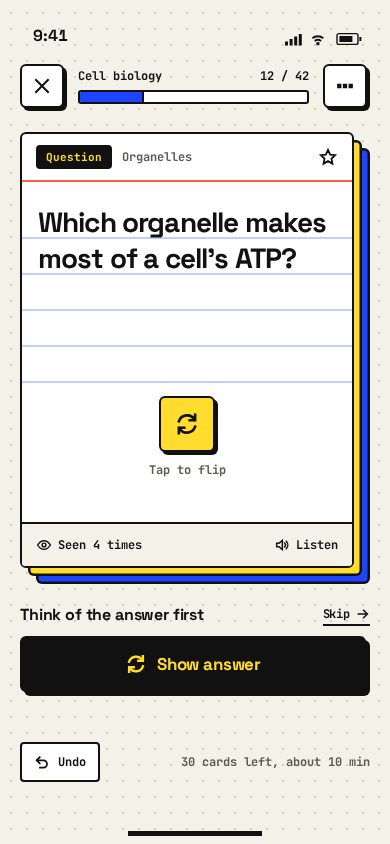
A media screen from Recall, a flashcards and spaced repetition app template in a Neubrutalism style. Screen 11 of 25.
Recall is a complete flashcard app: welcome, a daily goal, sign in and a code, a home with the cards due today, decks, a deck with its cards, a study session that flips and rates each card, a quick test, a session summary, adding cards and decks, stats with a forgetting curve, a streak calendar, shared decks, an exam countdown, a Plus plan, notifications, profile and settings. Everything is an index card: ruled, outlined in black and stacked on colour.
| Detail | Value |
|---|---|
| Screen type | Media |
| App | Recall: Flashcards and spaced repetition |
| Category | Education |
| Design language | Neubrutalism, light |
| Type | Space Grotesk |
| Colours | #f4f1e8 background, #ffffff surface, #111111 text, #5c5a52 text-muted, #1f44ff accent, #ffffff accent-contrast, #ffdc2e secondary, #111111 border, #ff5b47 danger |
What this screen says
- Cell biology 12 / 42
- QuestionOrganelles
- Which organelle makes most of a cell's ATP?
- Tap to flip
- Seen 4 times Listen
- Think of the answer firstSkip
- Show answer
- Undo 30 cards left, about 10 min
Around it in Recall
More player, camera and editor screens
- Syntax Lesson: Learn to code
- Tuckin Reader: Bedtime stories for kids
- Zenith Sky map: Night sky guide
- Chalk Lesson: Design courses
- Encore Lesson: Creator courses
- Classroom Scan pages: Class stream and assignments
- Studyhall Video lesson: Free lessons and practice for school
- Tutor Lesson room: Book online tutors for any skill
- Leaf Reader: E-books and reading
- Almanac Picture of the day: The free encyclopedia reader
- Tiles Fiver: Daily word and number puzzles
- Stacks Reader: Borrow e-books and audiobooks from your library
Every education app media screen
What makes a good media player screen
- Content takes the space. Artwork, video or the camera view should fill most of the screen.
- Primary controls in the thumb zone. Play and pause, the shutter or the main tool, large and low on the screen.
- Show progress and position. A scrubber with elapsed and remaining time, or the step in a lesson.
- Hide secondary controls until needed. Lyrics, queue, filters and advanced tools can live behind a tap or a swipe.
The full media player screen guide and every example
Remix Recall free: describe your own app and it is drawn in this design. Or get its files from $10: Figma, React Native, SwiftUI, Flutter and HTML.