Templates · Paywall screens · Social app · Quorum
Quorum Plus screen
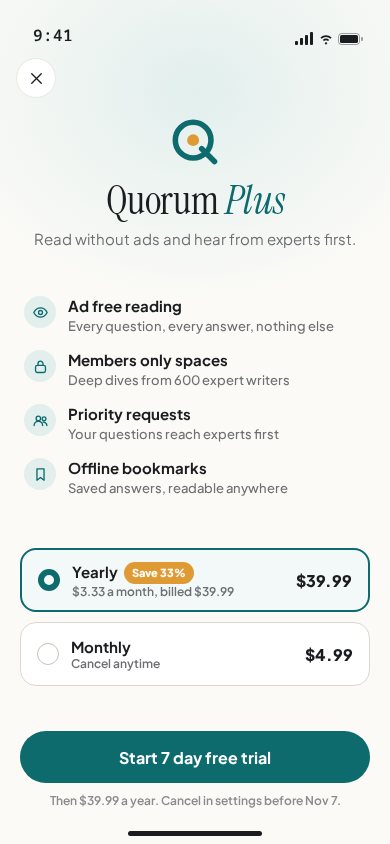
A paywall screen from Quorum, a questions and expert answers app template in a Minimal style. Screen 24 of 25.
Quorum is a complete question and answer app: welcome, topic picking and sign in, a home feed of questions with their top answer, a question page with several ranked answers, a full answer with photos and comments, an answer composer, asking a question with topics and answer requests, a posted confirmation, answer requests, search and results, a topic, spaces and a space, notifications, a profile with credentials, editing credentials, answer stats, bookmarks, a Plus plan and settings. Paper white with a serif for questions, petrol teal and honey amber.
| Detail | Value |
|---|---|
| Screen type | Paywall |
| App | Quorum: Questions and expert answers |
| Category | Social |
| Design language | Minimal, light |
| Type | Instrument Serif for headings, Plus Jakarta Sans for text |
| Colours | #fbfaf7 background, #ffffff surface, #1a1c1f text, #6e6f73 text-muted, #0d6b6e accent, #ffffff accent-contrast, #e09a33 secondary, #ebe8e1 border, #d14b3a danger |
What this screen says
- Quorum Plus
- Read without ads and hear from experts first.
- Ad free readingEvery question, every answer, nothing else
- Members only spacesDeep dives from 600 expert writers
- Priority requestsYour questions reach experts first
- Offline bookmarksSaved answers, readable anywhere
- YearlySave 33% $3.33 a month, billed $39.99
- MonthlyCancel anytime
- Start 7 day free trial
- Then $39.99 a year. Cancel in settings before Nov 7.
Around it in Quorum
More paywall screens
- Parrot Plus: Private messaging, groups and calls
- Carrier Plus: Cloud messaging with channels
- Vista Plus: Photos, stories and reels
- Flick Plus: Short video feed
- Squawk Plus: Short posts and live conversation
- Agora Plus: Communities, threads and votes
- Spark Plus: Swipe dating
- Candid Plus: One real photo a day
- Blink Plus: Camera chat and stories
- Cipher Supporter: Encrypted private messenger
- Commons Plus: Friends, groups and events
- Tether Plus: Family location and safety
Every social app paywall screen
What makes a good paywall screen
- Lead with the outcome, not the feature list. The headline should say what changes for the person: "Train smarter every week" beats "Unlock Premium". Three to five benefits underneath are enough; more turns into a wall of ticks nobody reads.
- Show the real price, period and trial terms. State the price, how often it renews and when a free trial turns into a charge, near the button. Apple's App Store guideline 3.1.2 asks subscription apps to make this clear before purchase, and Google Play has similar rules.
- One primary button. The main call to action should be impossible to miss and say what happens: "Start 7-day free trial" or "Subscribe for $4.99/month". A second plan choice is fine; a second competing button is not.
- Make the plans easy to compare. When you offer monthly and yearly, show both prices in the same unit (per month or per week) and mark the saving on the yearly plan in plain numbers, not just a badge.
The full paywall screen guide and every example
Remix Quorum free: describe your own app and it is drawn in this design. Or get its files from $10: Figma, React Native, SwiftUI, Flutter and HTML.