Templates · Paywall screens · Social app · Parrot
Parrot Plus screen
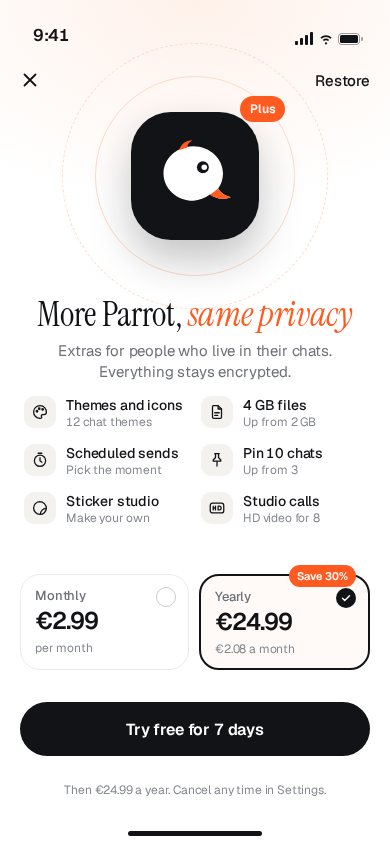
A paywall screen from Parrot, a social app template in a Minimal style. Screen 23 of 25.
Parrot is a complete everyday messenger: welcome, phone number and code, profile setup, a chat list with filters, pinned and archived chats, a one to one chat with photos, a voice note and replies, a group chat with a poll, contact and group info, a new chat picker, a new group, search across messages, shared media, the camera, live location, voice and video calls, a call log, status updates and a story, sending money in a chat with a receipt, a Plus plan, storage and data, and settings. White and paper grey with ink and a single vermilion accent.
| Detail | Value |
|---|---|
| Screen type | Paywall |
| App | Parrot: Private messaging, groups and calls |
| Category | Social |
| Design language | Minimal, light |
| Type | Instrument Serif for headings, Geist for text |
| Colours | #ffffff background, #f3f2ee surface, #121316 text, #85888f text-muted, #ff5a1f accent, #ffffff accent-contrast, #121316 secondary, #ecebe7 border, #e5352b danger |
What this screen says
- Restore
- Plus
- More Parrot, same privacy
- Extras for people who live in their chats. Everything stays encrypted.
- Themes and icons12 chat themes
- 4 GB filesUp from 2 GB
- Scheduled sendsPick the moment
- Pin 10 chatsUp from 3
- Sticker studioMake your own
- Studio callsHD video for 8
- Monthly
- €2.99per month
- Save 30%
- Yearly
- €24.99€2.08 a month
- Try free for 7 days
- Then €24.99 a year. Cancel any time in Settings.
Around it in Parrot
More paywall screens
- Natter Plus: Minimal messenger
- Nearly Plus: Dating by crossed paths
- Linkup Pro: Professional network and jobs
- Quorum Plus: Questions and expert answers
- Backer Creator plans: Support creators with memberships
- Pledge Plus: Back creative projects
- Civic Permit plans: Report issues and city services
- Guild Plus: Community servers with voice and text chat
- Carrier Plus: Cloud messaging with channels
- Vista Plus: Photos, stories and reels
- Flick Plus: Short video feed
- Squawk Plus: Short posts and live conversation
Every social app paywall screen
What makes a good paywall screen
- Lead with the outcome, not the feature list. The headline should say what changes for the person: "Train smarter every week" beats "Unlock Premium". Three to five benefits underneath are enough; more turns into a wall of ticks nobody reads.
- Show the real price, period and trial terms. State the price, how often it renews and when a free trial turns into a charge, near the button. Apple's App Store guideline 3.1.2 asks subscription apps to make this clear before purchase, and Google Play has similar rules.
- One primary button. The main call to action should be impossible to miss and say what happens: "Start 7-day free trial" or "Subscribe for $4.99/month". A second plan choice is fine; a second competing button is not.
- Make the plans easy to compare. When you offer monthly and yearly, show both prices in the same unit (per month or per week) and mark the saving on the yearly plan in plain numbers, not just a badge.
The full paywall screen guide and every example
Remix Parrot free: describe your own app and it is drawn in this design. Or get its files from $10: Figma, React Native, SwiftUI, Flutter and HTML.