Templates · Paywall screens · Social app · Blink
Blink Plus screen
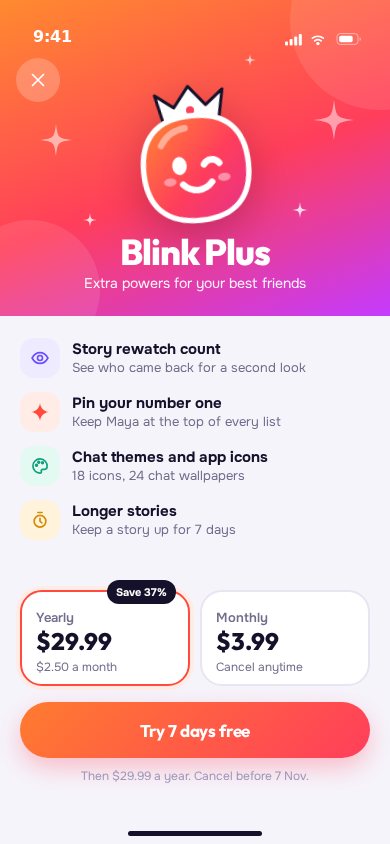
A paywall screen from Blink, a camera chat and stories app template in a Gen Z style. Screen 23 of 25.
Blink is a complete camera chat app: welcome, username, log in and a code, a camera home with lenses and a flame shutter, a lens explorer, a snap editor with stickers and captions, send to friends and a sent screen, chats with diamond status pips and streaks, a disappearing conversation, a full screen snap, a video call, stories and a story viewer, a live friend map, a friend profile, streak stats, memories, add friends, a new group, notifications, Blink Plus, profile and settings. Lilac milk and white with a tangerine to watermelon flame, ultraviolet and mint.
| Detail | Value |
|---|---|
| Screen type | Paywall |
| App | Blink: Camera chat and stories |
| Category | Social |
| Design language | Gen Z, light |
| Type | Outfit for headings, Onest for text |
| Colours | #f6f4fb background, #ffffff surface, #16112b text, #736d8c text-muted, #ff4a3d accent, #ffffff accent-contrast, #6a4dff secondary, #e8e4f2 border, #e5243b danger |
What this screen says
- Blink Plus
- Extra powers for your best friends
- Story rewatch countSee who came back for a second look
- Pin your number oneKeep Maya at the top of every list
- Chat themes and app icons18 icons, 24 chat wallpapers
- Longer storiesKeep a story up for 7 days
- Save 37%Yearly$29.99$2.50 a month
- Monthly$3.99Cancel anytime
- Try 7 days free
- Then $29.99 a year. Cancel before 7 Nov.
Around it in Blink
More paywall screens
- Parrot Plus: Private messaging, groups and calls
- Carrier Plus: Cloud messaging with channels
- Vista Plus: Photos, stories and reels
- Flick Plus: Short video feed
- Squawk Plus: Short posts and live conversation
- Agora Plus: Communities, threads and votes
- Spark Plus: Swipe dating
- Candid Plus: One real photo a day
- Cipher Supporter: Encrypted private messenger
- Commons Plus: Friends, groups and events
- Tether Plus: Family location and safety
- Facet Plus: Video calls with family and friends
Every social app paywall screen
What makes a good paywall screen
- Lead with the outcome, not the feature list. The headline should say what changes for the person: "Train smarter every week" beats "Unlock Premium". Three to five benefits underneath are enough; more turns into a wall of ticks nobody reads.
- Show the real price, period and trial terms. State the price, how often it renews and when a free trial turns into a charge, near the button. Apple's App Store guideline 3.1.2 asks subscription apps to make this clear before purchase, and Google Play has similar rules.
- One primary button. The main call to action should be impossible to miss and say what happens: "Start 7-day free trial" or "Subscribe for $4.99/month". A second plan choice is fine; a second competing button is not.
- Make the plans easy to compare. When you offer monthly and yearly, show both prices in the same unit (per month or per week) and mark the saving on the yearly plan in plain numbers, not just a badge.
The full paywall screen guide and every example
Remix Blink free: describe your own app and it is drawn in this design. Or get its files from $10: Figma, React Native, SwiftUI, Flutter and HTML.