Templates · Paywall screens · Social app · Squawk
Squawk Plus screen
A paywall screen from Squawk, a short posts and live conversation app template in a Minimal style. Screen 22 of 25.
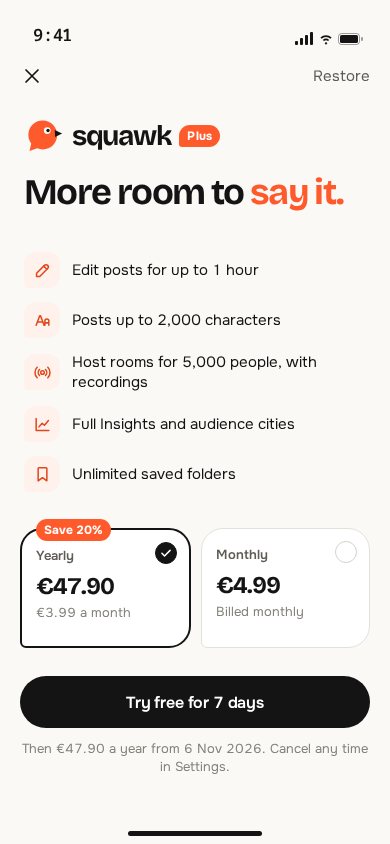
Squawk is a complete short post social app: welcome, topic picks, sign in and a code check, a For you feed with a live room strip, a post with its replies, compose with a photo and a keyboard, a full screen photo, explore with trends, search results, a trending topic with a poll, live rooms and a room with speakers, captions and listeners, messages and a chat, activity, your profile and someone else's, followers, saved folders, insights, a Plus plan with checkout and confirmation, and settings. White and warm stone with ink and one vermillion accent.
| Detail | Value |
|---|---|
| Screen type | Paywall |
| App | Squawk: Short posts and live conversation |
| Category | Social |
| Design language | Minimal, light |
| Type | Bricolage Grotesque for headings, Onest for text |
| Colours | #ffffff background, #f5f4f0 surface, #141414 text, #85827a text-muted, #ff5a2c accent, #ffffff accent-contrast, #fff1eb secondary, #efeee9 border, #e2461b danger |
What this screen says
- Restore
- squawk Plus
- More room to say it.
- Edit posts for up to 1 hour
- Posts up to 2,000 characters
- Host rooms for 5,000 people, with recordings
- Full Insights and audience cities
- Unlimited saved folders
- Save 20% Yearly€47.90€3.99 a month
- Monthly€4.99Billed monthly
- Try free for 7 days
- Then €47.90 a year from 6 Nov 2026. Cancel any time in Settings.
Around it in Squawk
More paywall screens
- Kin Plus: Private family circle
- Confetti Plus: Party invites and RSVPs
- Ripple Plus: Voice notes social
- Duo Private: An app for two
- Soapbox Loud: Weekly debates and polls
- Ballot Plus: Settle it on paper
- Murmur Plus: Chat rooms for art lovers
- Wink Plus: Video first dating
- Snoot Plus: Social app for pets
- Huddle Plus: Interest groups and meetups
- Glade Plus: Photo and clip social network
- Onair Plus: Live streaming
Every social app paywall screen
What makes a good paywall screen
- Lead with the outcome, not the feature list. The headline should say what changes for the person: "Train smarter every week" beats "Unlock Premium". Three to five benefits underneath are enough; more turns into a wall of ticks nobody reads.
- Show the real price, period and trial terms. State the price, how often it renews and when a free trial turns into a charge, near the button. Apple's App Store guideline 3.1.2 asks subscription apps to make this clear before purchase, and Google Play has similar rules.
- One primary button. The main call to action should be impossible to miss and say what happens: "Start 7-day free trial" or "Subscribe for $4.99/month". A second plan choice is fine; a second competing button is not.
- Make the plans easy to compare. When you offer monthly and yearly, show both prices in the same unit (per month or per week) and mark the saving on the yearly plan in plain numbers, not just a badge.
The full paywall screen guide and every example
Remix Squawk free: describe your own app and it is drawn in this design. Or get its files from $10: Figma, React Native, SwiftUI, Flutter and HTML.