Templates · Profile screens · Productivity app · Margin
Margin Profile screen
A profile screen from Margin, an AI note taking app template in a Dark-first style. Screen 24 of 25.
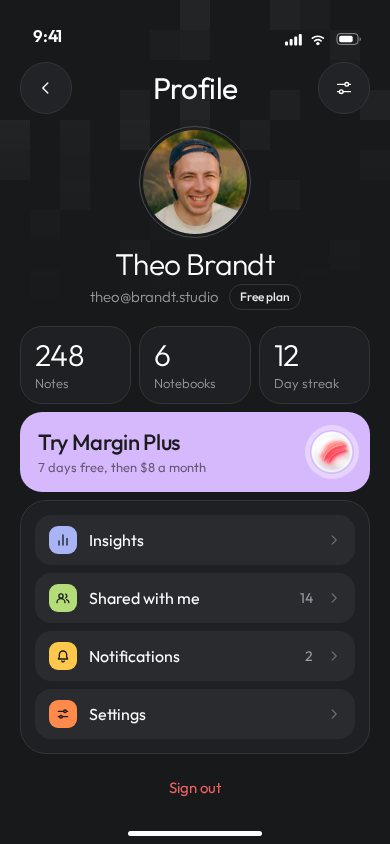
Margin is a complete AI note taking app: onboarding, sign in, a first-run setup, a home wall of colour note cards and photos, search, notebooks, a note with collaborators and a sketch, the note menu, editing, moving a note, voice recording with a transcript, AI summaries, asking your notes and reading the answer, tasks pulled from notes, insights, sharing, notifications, a paid plan, profile and settings. Charcoal dark with huge light headlines, pastel cards and a glossy coral orb for the assistant.
| Detail | Value |
|---|---|
| Screen type | Profile |
| App | Margin: AI note taking |
| Category | Productivity |
| Design language | Dark-first, dark |
| Type | Outfit |
| Colours | #18191b background, #222326 surface, #ffffff text, #9b9ca3 text-muted, #ff8a4c accent, #18191b accent-contrast, #a9b4f7 secondary, #34353a border, #f0625f danger |
What this screen says
- Profile
- Theo Brandt
- theo@brandt.studioFree plan
- 248Notes
- 6Notebooks
- 12Day streak
- Try Margin Plus
- 7 days free, then $8 a month
- Insights
- Shared with me
- Notifications
- Settings
- Sign out
Around it in Margin
More profile screens
- Beam Profile: Send big files
- Parchment Profile: Documents, edit and share
- Lectern Profile: Slides and presenter remote
- Ringer My card: Phone, contacts and voicemail
- Pipeline Profile: Sales CRM on the road
- Aim Teammate: Goals and key results
- Scribe Profile: Voice memos to notes
- Inkline Profile: Sign and send contracts
- Dispatch Profile: Field service jobs for technicians
- Stash Profile: Read-it-later and highlights
- Uptime Profile: Server and site monitoring
- Branch Profile: Mind maps
Every productivity app profile screen
What makes a good profile screen
- Lead with identity. Photo, name and one line about the person at the top. It confirms whose profile this is.
- Show meaningful stats. Two to four numbers that matter in this app, like workouts, followers, books read or streak.
- Make editing obvious for the owner. An Edit profile button near the top, shown only on your own profile.
- Organise content with tabs. Posts, activity, saved or achievements as tabs keep a long profile tidy.
The full profile screen guide and every example
Remix Margin free: describe your own app and it is drawn in this design. Or get its files from $10: Figma, React Native, SwiftUI, Flutter and HTML.