Templates · Profile screens · Productivity app · Jot
Jot Profile screen
A profile screen from Jot, a quick notes and checklists app template in a Minimal style. Screen 24 of 25.
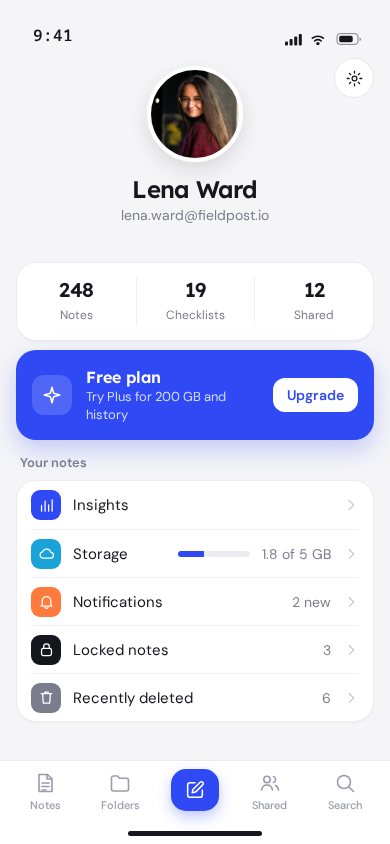
Jot is a complete everyday notes app: welcome, storage setup, sign in, a notes home with pinned cards and today's notes, folders with smart folders, a gallery folder, a note with a photo and checklist, a shared grocery checklist, a budget table, a sketch canvas with a tool tray, a document camera and the scanned result with found text, a format sheet, search that reaches inside tables and scans, tags, shared notes with live collaboration, sharing and an invite confirmation, a locked note, insights, notifications, a Plus plan, profile and settings. Cool paper grey and white with cobalt ink and a tangerine fold.
| Detail | Value |
|---|---|
| Screen type | Profile |
| App | Jot: Quick notes and checklists |
| Category | Productivity |
| Design language | Minimal, light |
| Type | Lexend for headings, DM Sans for text |
| Colours | #f5f5f8 background, #ffffff surface, #16161d text, #7c7d8c text-muted, #2f49f5 accent, #ffffff accent-contrast, #ff7a3d secondary, #ebebf1 border, #ec4f8b danger |
What this screen says
- Lena Ward
- lena.ward@fieldpost.io
- 248Notes
- 19Checklists
- 12Shared
- Free planTry Plus for 200 GB and history
- Upgrade
- Your notes
- Insights
- Storage
- 1.8 of 5 GB
- Notifications 2 new
- Locked notes 3
- Recently deleted 6
- Notes
- Folders
- Shared
- Search
Around it in Jot
More profile screens
- Aide Profile: Executive AI assistant
- Juno Profile: AI chat assistant
- Opal Profile: Studio dashboard
- Chrono Profile: World clock, timers and stopwatch
- Frontdesk Customer: Customer support inbox
- Campaign Contact: Email marketing campaigns
- Outpost Channel: Schedule social posts
- Pageview Account: Website analytics
- Polish Profile: Writing assistant and keyboard
- Tapline Profile: Link-in-bio pages and analytics
- Quill Account: Docs, wikis and databases in one workspace
- Tandem Profile: Team chat, channels and huddles
Every productivity app profile screen
What makes a good profile screen
- Lead with identity. Photo, name and one line about the person at the top. It confirms whose profile this is.
- Show meaningful stats. Two to four numbers that matter in this app, like workouts, followers, books read or streak.
- Make editing obvious for the owner. An Edit profile button near the top, shown only on your own profile.
- Organise content with tabs. Posts, activity, saved or achievements as tabs keep a long profile tidy.
The full profile screen guide and every example
Remix Jot free: describe your own app and it is drawn in this design. Or get its files from $10: Figma, React Native, SwiftUI, Flutter and HTML.