Templates · Profile screens · Education app · Quanta
Quanta Profile screen
A profile screen from Quanta, an interactive physics lessons app template in a Dark-first style. Screen 24 of 25.
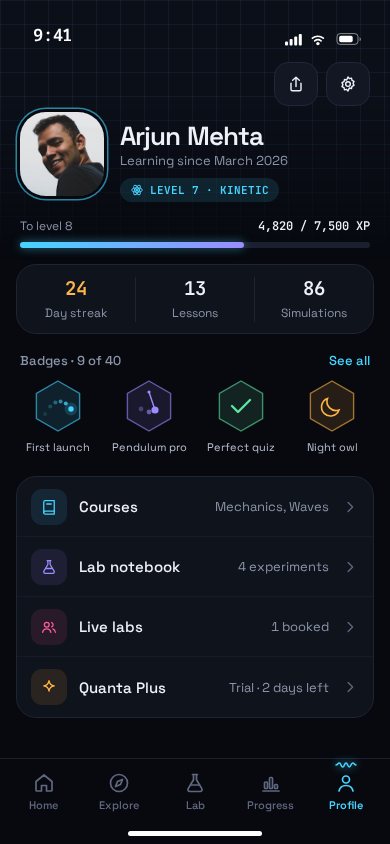
Quanta is a complete physics learning app: welcome, a goal picker and sign in, a home with the lesson in progress, explore by topic, a course map, a lesson page, an interactive projectile simulation with sliders, an animated explainer, a quiz with feedback and a lesson complete screen, a live pendulum lab, a lab notebook and a results form, a formula sheet and formula page, progress stats, live tutor labs with booking and confirmation, a Plus plan, notifications, profile and settings. Ink black and graph paper with photon cyan, amber energy and magenta force.
| Detail | Value |
|---|---|
| Screen type | Profile |
| App | Quanta: Interactive physics lessons |
| Category | Education |
| Design language | Dark-first, dark |
| Type | Instrument Serif for headings, Space Grotesk for text |
| Colours | #07090f background, #0f131c surface, #eef1f8 text, #8a93a8 text-muted, #45d4ff accent, #03121a accent-contrast, #ffb547 secondary, #1e2433 border, #ff5c9a danger |
What this screen says
- Arjun Mehta
- Learning since March 2026
- LEVEL 7 · KINETIC
- To level 8 4,820 / 7,500 XP
- 24Day streak
- 13Lessons
- 86Simulations
- Badges · 9 of 40See all
- First launch
- Pendulum pro
- Perfect quiz
- Night owl
- CoursesMechanics, Waves
- Lab notebook4 experiments
- Live labs1 booked
- Quanta PlusTrial · 2 days left
- Home
- Explore
- Lab
- Progress
- Profile
Around it in Quanta
More profile screens
- Almanac Profile: The free encyclopedia reader
- Tiles Profile: Daily word and number puzzles
- Stacks Profile: Borrow e-books and audiobooks from your library
- Penpal Partner: Language exchange chat
- Lexis Profile: A word a day
- Cram Profile: Exam prep and mock tests
- Quad Profile: University campus app
- Palm Profile: Learn sign language
- Epoch Profile: History on a timeline
- Wren Reader profile: Early reading for kids
- Proof Profile: Maths tutor that shows its working
- Skim Profile: Speed reading trainer
Every education app profile screen
What makes a good profile screen
- Lead with identity. Photo, name and one line about the person at the top. It confirms whose profile this is.
- Show meaningful stats. Two to four numbers that matter in this app, like workouts, followers, books read or streak.
- Make editing obvious for the owner. An Edit profile button near the top, shown only on your own profile.
- Organise content with tabs. Posts, activity, saved or achievements as tabs keep a long profile tidy.
The full profile screen guide and every example
Remix Quanta free: describe your own app and it is drawn in this design. Or get its files from $10: Figma, React Native, SwiftUI, Flutter and HTML.