Templates · Onboarding screens · Smart home app · Puddle
Puddle Connect controller screen
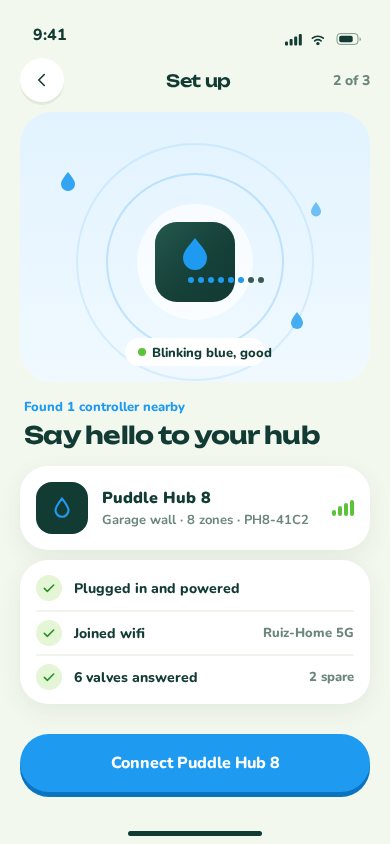
An onboarding screen from Puddle, a garden watering and sprinklers app template in a Playful style. Screen 2 of 25.
Puddle is a complete smart sprinkler and garden watering app: welcome, pairing the controller, sign in, a garden home with every zone as a droplet gauge, zones and a zone page with soil moisture, a live watering run, a done screen, schedules and a schedule editor, adding a zone, a rain skip weather forecast, water usage, a plant library and plant care page, a drawn garden map, a camera plant check, a shop with a product, basket and order placed, notifications, a Plus plan, profile and settings. Sprout green and white with pond blue water, leaf green, sun yellow and clay.
| Detail | Value |
|---|---|
| Screen type | Onboarding |
| App | Puddle: Garden watering and sprinklers |
| Category | Smart home |
| Design language | Playful, light |
| Type | Unbounded for headings, Nunito for text |
| Colours | #f3f8ee background, #ffffff surface, #123b34 text, #6b867d text-muted, #1e9bf0 accent, #ffffff accent-contrast, #5cc23a secondary, #e1eadc border, #f0784a danger |
What this screen says
- Set up
- 2 of 3
- Found 1 controller nearby
- Say hello to your hub
- Puddle Hub 8Garage wall · 8 zones · PH8-41C2
- Plugged in and powered
- Joined wifiRuiz-Home 5G
- 6 valves answered2 spare
- Connect Puddle Hub 8
Around it in Puddle
More onboarding screens
- Upkeep Welcome: Home maintenance calendar
- Kelvin Welcome: Climate and thermostat
- Glow Welcome: Light scenes and colour
- Tagged Welcome: Home inventory for insurance
- Lobby Welcome: Apartment building app
- Sweep Welcome: Robot vacuum and mop
- Dusk Welcome: Smart home scenarios
- Lumen Welcome: Smart home energy
- Abode Welcome: Smart home devices
- Boxed Welcome: Book movers and plan moving day
- Meter Welcome: Your energy supplier account
- Couch Welcome: TV remote, casting and watchlist
Every smart home app onboarding screen
What makes a good onboarding screen
- One idea per screen. Each screen should say one thing in a headline people can read in a second. If a screen needs a paragraph, it is doing too much.
- Personalise with a purpose. Ask a question only if the answer changes what people see next, like a goal, a level or an interest. Then show that the answer mattered.
- Explain permissions before asking. Show your own screen saying why you need notifications, location or the camera before the system prompt. People who understand the reason are more likely to allow it.
- Let people skip. A visible skip or "I'll do this later" respects returning users and the impatient. Make sure skipping still lands them somewhere useful.
The full onboarding screen guide and every example
Remix Puddle free: describe your own app and it is drawn in this design. Or get its files from $10: Figma, React Native, SwiftUI, Flutter and HTML.