Templates · Detail screens · Lifestyle app · Posy
Posy Stem screen
A detail screen from Posy, a flower delivery and weekly stems app template in a Luxury style. Screen 9 of 25.
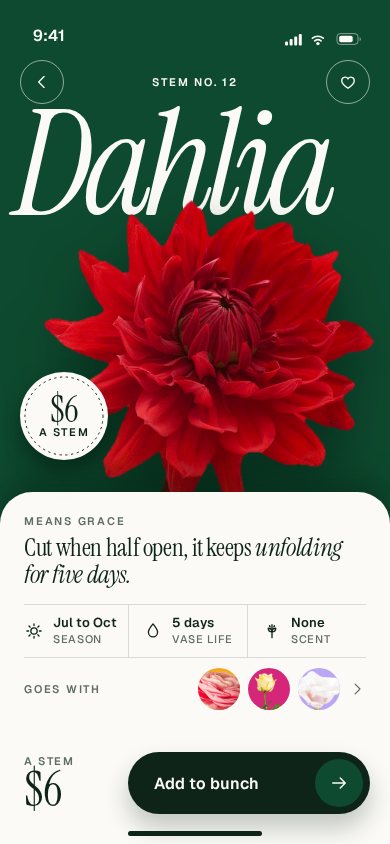
Posy is a complete flower shop: welcome, sign in and verify, a home with today's pick, a shop by colour and occasion, search, a bouquet page, a stem by stem bouquet builder, single flower pages, recipient, card message and delivery hour forms, basket, checkout, confirmation and live courier tracking, order history, a weekly subscription with its delivery calendar, a vase life tracker, dates to remember, notifications, profile and settings. Twenty eight flowers are true cut-outs sitting straight on the colour.
| Detail | Value |
|---|---|
| Screen type | Detail |
| App | Posy: Flower delivery and weekly stems |
| Category | Lifestyle |
| Design language | Luxury, light |
| Type | Geist |
| Colours | #e8432a background, #fbfaf6 surface, #0f2419 text, #5f6d63 text-muted, #0f2419 accent, #fbfaf6 accent-contrast, #f5a91e secondary, #e3e0d4 border, #b3261a danger |
What this screen says
- Stem no. 12
- Dahlia
- $6A stem
- Means grace
- Cut when half open, it keeps unfolding for five days.
- Jul to OctSeason
- 5 daysVase life
- NoneScent
- Goes with
- A stem$6
- Add to bunch
Around it in Posy
More detail screens
- Brief Full story: News in sixty words
- Kibble Product: Pet supplies and autoship
- Filmlog Film: Film diary and reviews
- Guardrail Child: Parental controls and screen time
- Collar Escape alert: GPS pet tracker
- Postage Item: Send parcels and find drop-off points
- Specs Frame: Glasses with virtual try-on
- Circuit Product: Electronics store with trade-in and repairs
- Provenance Item: Authenticated luxury resale
- Gavel Lot: Live online auctions
- Tidy Deep clean: Book home cleaners
- Dorm Property: Find student housing
Every lifestyle app detail screen
What makes a good detail screen
- Lead with what identifies the item. A large image or title, the price or status, and the key facts at the top. People should know they are in the right place at a glance.
- Keep the main action visible. A sticky bottom button for Add to cart, Book or Play stays reachable while people scroll through details.
- Order information by importance. The facts that decide the choice come first; reviews, specifications and fine print further down.
- Use progressive disclosure. Long descriptions, specifications and policies can expand on tap rather than filling the screen.
The full detail screen guide and every example
Remix Posy free: describe your own app and it is drawn in this design. Or get its files from $10: Figma, React Native, SwiftUI, Flutter and HTML.