Templates · List and feed screens · Lifestyle app · Posy
Posy Occasions screen
A list screen from Posy, a flower delivery and weekly stems app template in a Luxury style. Screen 10 of 25.
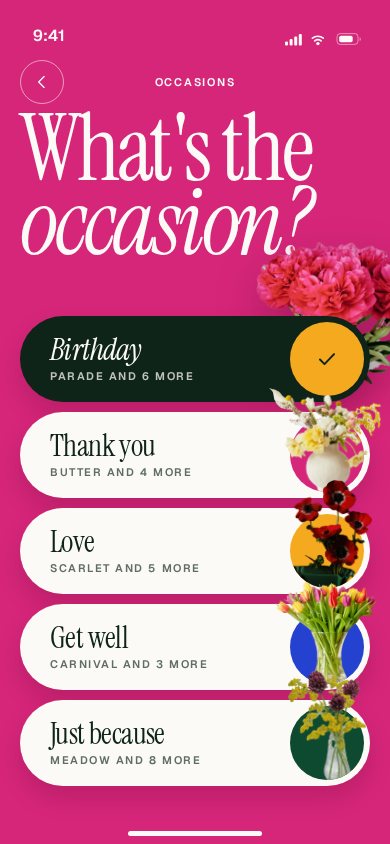
Posy is a complete flower shop: welcome, sign in and verify, a home with today's pick, a shop by colour and occasion, search, a bouquet page, a stem by stem bouquet builder, single flower pages, recipient, card message and delivery hour forms, basket, checkout, confirmation and live courier tracking, order history, a weekly subscription with its delivery calendar, a vase life tracker, dates to remember, notifications, profile and settings. Twenty eight flowers are true cut-outs sitting straight on the colour.
| Detail | Value |
|---|---|
| Screen type | List |
| App | Posy: Flower delivery and weekly stems |
| Category | Lifestyle |
| Design language | Luxury, light |
| Type | Geist |
| Colours | #e8432a background, #fbfaf6 surface, #0f2419 text, #5f6d63 text-muted, #0f2419 accent, #fbfaf6 accent-contrast, #f5a91e secondary, #e3e0d4 border, #b3261a danger |
What this screen says
- Occasions
- What's the
- occasion?
- Birthday
- Parade and 6 more
- Thank you
- Butter and 4 more
- Love
- Scarlet and 5 more
- Get well
- Carnival and 3 more
- Just because
- Meadow and 8 more
Around it in Posy
More list and feed screens
- Torque Service: The workshop manual for your own car
- Vetly Pets: Pet health record
- Stitch Projects: A knitting companion drawn as one big knitting chart
- Roost Shopping list: Your shared house, stuck to the fridge door
- Trellis Beds: Vegetable garden planner
- Grain Album: Camera and photo editor
- Fern Reminders: Plant care
- Doorstep Results: Homes for sale and rent
- Rewear Offers: Secondhand fashion marketplace
- Laced Calendar: Sneaker drops and raffles
- Gloss Salons: Salon and spa booking
- Vow Notifications: Wedding planner
Every lifestyle app list screen
What makes a good list screen
- Show what people need to decide. Each row should carry just enough to choose: a title, one or two details and a status. Everything else belongs on the detail screen.
- Keep rows consistent. The same information in the same place on every row lets people scan down a column instead of reading each item.
- Group with headings. Dates, categories or status headings break long lists into chunks people can skip through.
- Make common actions quick. Swipe actions, a checkbox or a heart on the row save opening the item for small tasks.
The full list screen guide and every example
Remix Posy free: describe your own app and it is drawn in this design. Or get its files from $10: Figma, React Native, SwiftUI, Flutter and HTML.