Templates · Detail screens · Productivity app · Postbox
Postbox Calendar invite screen
A detail screen from Postbox, an email for busy teams app template in an Enterprise style. Screen 18 of 25.
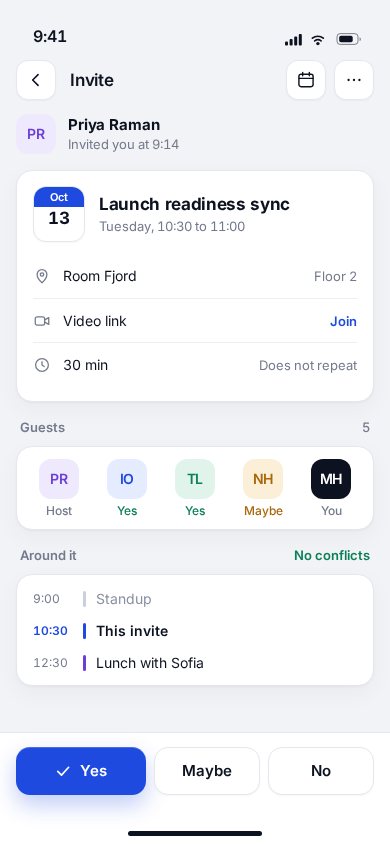
Postbox is a complete email client: welcome, sign in, connecting an account, a code and inbox setup, the inbox with a focus card, swipe actions, a thread with attachments and quick replies, compose with a keyboard, sent with undo, snooze, the snoozed list, a focus inbox, search and results, labels and label editing, a calendar invite, the day's agenda, attachments, reply time insights, notifications, a Pro plan, accounts and settings. Cobalt marks whatever is unread, selected or next.
| Detail | Value |
|---|---|
| Screen type | Detail |
| App | Postbox: Email for busy teams |
| Category | Productivity |
| Design language | Enterprise, light |
| Type | Inter |
| Colours | #f2f3f6 background, #ffffff surface, #0d1220 text, #737a8c text-muted, #1f4ae0 accent, #ffffff accent-contrast, #e6ecff secondary, #e4e7ee border, #dc3b3b danger |
What this screen says
- Invite
- PR
- Priya RamanInvited you at 9:14
- Oct13
- Launch readiness sync
- Tuesday, 10:30 to 11:00
- Room Fjord Floor 2
- Video link Join
- 30 min Does not repeat
- Guests5
- PR Host
- IO Yes
- TL Yes
- NH Maybe
- MH You
- Around itNo conflicts
- 9:00Standup
- 10:30This invite
- 12:30Lunch with Sofia
- Yes
- Maybe
- No
Around it in Postbox
More detail screens
- Juno Chat: AI chat assistant
- Opal Project: Studio dashboard
- Jot Note: Quick notes and checklists
- Chrono City: World clock, timers and stopwatch
- Frontdesk Ticket: Customer support inbox
- Campaign: Email marketing campaigns
- Outpost Previews: Schedule social posts
- Pageview Channel: Website analytics
- Polish Suggestion: Writing assistant and keyboard
- Tapline Link: Link-in-bio pages and analytics
- Quill Doc: Docs, wikis and databases in one workspace
- Tandem Channel: Team chat, channels and huddles
Every productivity app detail screen
What makes a good detail screen
- Lead with what identifies the item. A large image or title, the price or status, and the key facts at the top. People should know they are in the right place at a glance.
- Keep the main action visible. A sticky bottom button for Add to cart, Book or Play stays reachable while people scroll through details.
- Order information by importance. The facts that decide the choice come first; reviews, specifications and fine print further down.
- Use progressive disclosure. Long descriptions, specifications and policies can expand on tap rather than filling the screen.
The full detail screen guide and every example
Remix Postbox free: describe your own app and it is drawn in this design. Or get its files from $10: Figma, React Native, SwiftUI, Flutter and HTML.