Templates · Detail screens · Sports app · Pitwall
Pitwall Brakes screen
A detail screen from Pitwall, a race engineering app template in a Dark-first style. Screen 13 of 24.
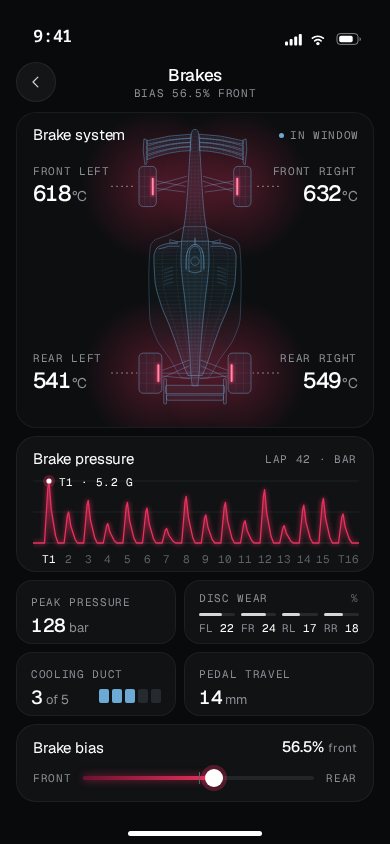
Pitwall is a complete race engineering app on carbon black: onboarding, sign in, a mission control home, a live track map, timing, driver and team radio, strategy and pit stops, a digital twin of the car with tyres, powertrain, brakes and telemetry, system logs and alerts, and a car development lab with simulations and design variables. Crimson for what matters, steel blue for reference data, mono labels throughout.
| Detail | Value |
|---|---|
| Screen type | Detail |
| App | Pitwall: Race engineering |
| Category | Sports |
| Design language | Dark-first, dark |
| Type | Geist Mono for headings, Geist for text |
| Colours | #080a0b background, #101214 surface, #ffffff text, #8b9096 text-muted, #c41f48 accent, #ffffff accent-contrast, #6ca9d4 secondary, #1d2023 border, #ff4d6d danger |
What this screen says
- Brakes
- Bias 56.5% front
- Brake system In window
- Front left 618°C
- Front right 632°C
- Rear left 541°C
- Rear right 549°C
- Brake pressure Lap 42 · bar
- Peak pressure
- 128bar
- Disc wear %
- FL 22
- FR 24
- RL 17
- RR 18
- Cooling duct
- 3of 5
- Pedal travel
- 14mm
- Brake bias 56.5%front
- Front
- Rear
Around it in Pitwall
More detail screens
- Elevens Match: Fantasy cricket leagues
- Scoreboard Box score: Scores and news for every sport
- Bib Race: Find and enter races
- Wicket Scorecard: Live cricket scores
- Courtside Court: Pickup basketball games
- Tack Venue: Sailing wind and regatta tracker
- Frag Tournament: Esports tournaments and teams
- Canter Instructor: Riding stables and lessons
- Ollie Spot: Skate spots and clips
- Eddy River: River levels for paddlers
- Whistle Match: Grassroots league manager for coaches
- Oche League: Darts scorer and leagues
Every sports app detail screen
What makes a good detail screen
- Lead with what identifies the item. A large image or title, the price or status, and the key facts at the top. People should know they are in the right place at a glance.
- Keep the main action visible. A sticky bottom button for Add to cart, Book or Play stays reachable while people scroll through details.
- Order information by importance. The facts that decide the choice come first; reviews, specifications and fine print further down.
- Use progressive disclosure. Long descriptions, specifications and policies can expand on tap rather than filling the screen.
The full detail screen guide and every example
Remix Pitwall free: describe your own app and it is drawn in this design. Or get its files from $10: Figma, React Native, SwiftUI, Flutter and HTML.