Templates · Detail screens · Sports app · Canter
Canter Instructor screen
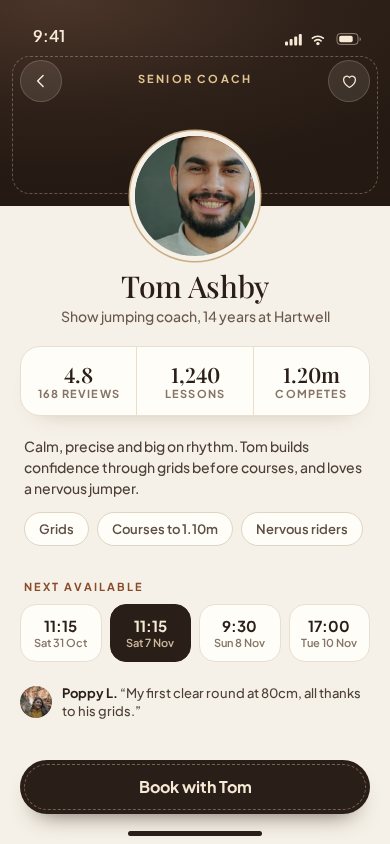
A detail screen from Canter, a riding stables and lessons app template in a Luxury style. Screen 7 of 25.
Canter is a complete riding stables app: welcome, rider level and sign in, a home with the next lesson on a stitched leather card, lessons to book, instructors, the stable of horses and a horse profile, a month calendar with time slots, review, payment and a rosette confirmation, a lesson plan drawn on a dressage arena, a live ride with gait tracking, ride summaries, progress, a ride journal and log form, a trail ride, video review, shows and results, membership, notifications, profile and settings. Linen and espresso leather with cognac, brass and rosette blue.
| Detail | Value |
|---|---|
| Screen type | Detail |
| App | Canter: Riding stables and lessons |
| Category | Sports |
| Design language | Luxury, light |
| Type | Playfair Display for headings, Plus Jakarta Sans for text |
| Colours | #f6f1e8 background, #fffdf8 surface, #2a1e18 text, #857567 text-muted, #8a4b2a accent, #f6ead6 accent-contrast, #2c4a8c secondary, #e8dfd0 border, #a3322b danger |
What this screen says
- Senior coach
- Tom Ashby
- Show jumping coach, 14 years at Hartwell
- 4.8168 reviews
- 1,240Lessons
- 1.20mCompetes
- Calm, precise and big on rhythm. Tom builds confidence through grids before courses, and loves a nervous jumper.
- Grids Courses to 1.10m Nervous riders
- Next available
- 11:15Sat 31 Oct
- 11:15Sat 7 Nov
- 9:30Sun 8 Nov
- 17:00Tue 10 Nov
- Poppy L. “My first clear round at 80cm, all thanks to his grids.”
- Book with Tom
Around it in Canter
More detail screens
- Tack Venue: Sailing wind and regatta tracker
- Frag Tournament: Esports tournaments and teams
- Ollie Spot: Skate spots and clips
- Eddy River: River levels for paddlers
- Whistle Match: Grassroots league manager for coaches
- Oche League: Darts scorer and leagues
- Cairn Trail: Trails, contours and summits on one map sheet
- Lapse Session: Swim training
- Angler Catch: A fishing log drawn on the depth chart
- Piste Gondola: Ski resort companion
- Crag Gym: Climbing gym logbook
- Fairway Course: Golf course guide and scorecard
Every sports app detail screen
What makes a good detail screen
- Lead with what identifies the item. A large image or title, the price or status, and the key facts at the top. People should know they are in the right place at a glance.
- Keep the main action visible. A sticky bottom button for Add to cart, Book or Play stays reachable while people scroll through details.
- Order information by importance. The facts that decide the choice come first; reviews, specifications and fine print further down.
- Use progressive disclosure. Long descriptions, specifications and policies can expand on tap rather than filling the screen.
The full detail screen guide and every example
Remix Canter free: describe your own app and it is drawn in this design. Or get its files from $10: Figma, React Native, SwiftUI, Flutter and HTML.