Templates · Detail screens · Sports app · Wicket
Wicket Scorecard screen
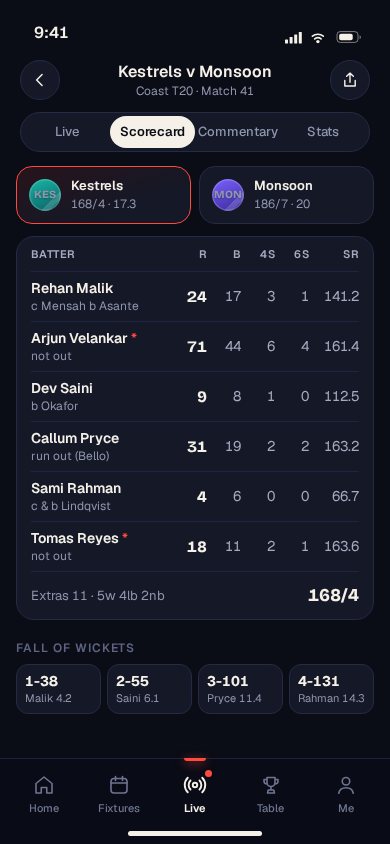
A detail screen from Wicket, a live cricket scores app template in a Dark-first style. Screen 7 of 25.
Wicket is a complete live cricket app: welcome, picking teams, sign in, a matchday home, a live scoreboard with the over strip and win probability, ball by ball commentary, the full scorecard, wagon wheel and pitch map, match stats, player and team pages, a venue, highlights, fixtures, the points table, search, match predictions, alerts, tickets with a seat map, checkout and a booked ticket, notifications, a Pro plan, profile and settings. Night navy with ball leather red, aqua and gold.
| Detail | Value |
|---|---|
| Screen type | Detail |
| App | Wicket: Live cricket scores |
| Category | Sports |
| Design language | Dark-first, dark |
| Type | Bricolage Grotesque for headings, Geist for text |
| Colours | #0a0c16 background, #141827 surface, #f5f1e8 text, #8f95ad text-muted, #ff4a3d accent, #ffffff accent-contrast, #36d6c3 secondary, #252b45 border, #ffc23d highlight |
What this screen says
- Kestrels v Monsoon
- Coast T20 · Match 41
- Live Scorecard Commentary Stats
- KES
- Kestrels
- 168/4 · 17.3
- MON
- Monsoon
- 186/7 · 20
- Batter R B 4s 6s SR
- Rehan Malik
- c Mensah b Asante
- Arjun Velankar *
- not out
- Dev Saini
- b Okafor
- Callum Pryce
- run out (Bello)
- Sami Rahman
- c & b Lindqvist
- Tomas Reyes *
- Extras 11 · 5w 4lb 2nb 168/4
- Fall of wickets
- 1-38Malik 4.2 2-55Saini 6.1 3-101Pryce 11.4 4-131Rahman 14.3
- Home
- Fixtures
- Live
- Table
- Me
Around it in Wicket
More detail screens
- Piste Gondola: Ski resort companion
- Crag Gym: Climbing gym logbook
- Fairway Course: Golf course guide and scorecard
- Matchday Lineups: Football scores and fantasy
- Rally Club: Tennis and padel club
- Swell Tides: Surf forecast
- Pitwall Tyres: Race engineering
- Elevens Match: Fantasy cricket leagues
- Scoreboard Box score: Scores and news for every sport
- Bib Race: Find and enter races
- Courtside Court: Pickup basketball games
- Tack Venue: Sailing wind and regatta tracker
Every sports app detail screen
What makes a good detail screen
- Lead with what identifies the item. A large image or title, the price or status, and the key facts at the top. People should know they are in the right place at a glance.
- Keep the main action visible. A sticky bottom button for Add to cart, Book or Play stays reachable while people scroll through details.
- Order information by importance. The facts that decide the choice come first; reviews, specifications and fine print further down.
- Use progressive disclosure. Long descriptions, specifications and policies can expand on tap rather than filling the screen.
The full detail screen guide and every example
Remix Wicket free: describe your own app and it is drawn in this design. Or get its files from $10: Figma, React Native, SwiftUI, Flutter and HTML.