Templates · List and feed screens · Productivity app · Pipeline
Pipeline Tasks screen
A list screen from Pipeline, a sales CRM on the road app template in an Enterprise style. Screen 21 of 25.
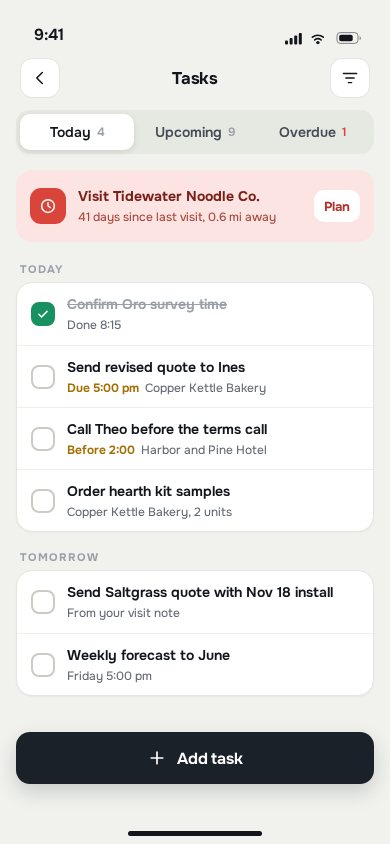
Pipeline is a complete field sales CRM: welcome and sign in, a Today screen with the next stop and quota, a live route map, check in on arrival, a stage board pipeline, deal, account and contact pages, search and a map of nearby accounts, visit logging with a voice note and a business card scanner, a new deal form, a quote with on device sign off and a deal won screen, a forecast dashboard, activity, tasks, notifications, a Pro plan, profile and settings. Stone grey and white with asphalt and marigold.
| Detail | Value |
|---|---|
| Screen type | List |
| App | Pipeline: Sales CRM on the road |
| Category | Productivity |
| Design language | Enterprise, light |
| Type | Onest |
| Colours | #f1f2ee background, #ffffff surface, #12161c text, #646b75 text-muted, #ffc53d accent, #12161c accent-contrast, #1b2128 secondary, #e3e5df border, #d9453b danger |
What this screen says
- Tasks
- Today 4 Upcoming 9 Overdue 1
- Visit Tidewater Noodle Co.
- 41 days since last visit, 0.6 mi away
- Plan
- Today
- Confirm Oro survey time
- Done 8:15
- Send revised quote to Ines
- Due 5:00 pm Copper Kettle Bakery
- Call Theo before the terms call
- Before 2:00 Harbor and Pine Hotel
- Order hearth kit samples
- Copper Kettle Bakery, 2 units
- Tomorrow
- Send Saltgrass quote with Nov 18 install
- From your visit note
- Weekly forecast to June
- Friday 5:00 pm
- Add task
Around it in Pipeline
More list and feed screens
- Beacon Devices: Find your devices and people
- Staffroom Inbox: HR, payslips and time off
- Slot Calendar: Booking links and meeting scheduling
- Sheet Base: Spreadsheets and databases
- Tunnel Specialty servers: VPN and online privacy
- Ping History: Internet speed test
- Glance History: Visual search with the camera
- Replay Library: Record and share screen videos
- Easel Templates: Collaborative whiteboard
- Token Requests: Two-factor codes and sign-in approvals
- Beam Transfers: Send big files
- Parchment Files: Documents, edit and share
Every productivity app list screen
What makes a good list screen
- Show what people need to decide. Each row should carry just enough to choose: a title, one or two details and a status. Everything else belongs on the detail screen.
- Keep rows consistent. The same information in the same place on every row lets people scan down a column instead of reading each item.
- Group with headings. Dates, categories or status headings break long lists into chunks people can skip through.
- Make common actions quick. Swipe actions, a checkbox or a heart on the row save opening the item for small tasks.
The full list screen guide and every example
Remix Pipeline free: describe your own app and it is drawn in this design. Or get its files from $10: Figma, React Native, SwiftUI, Flutter and HTML.