Templates · List and feed screens · Productivity app · Ping
Ping Notifications screen
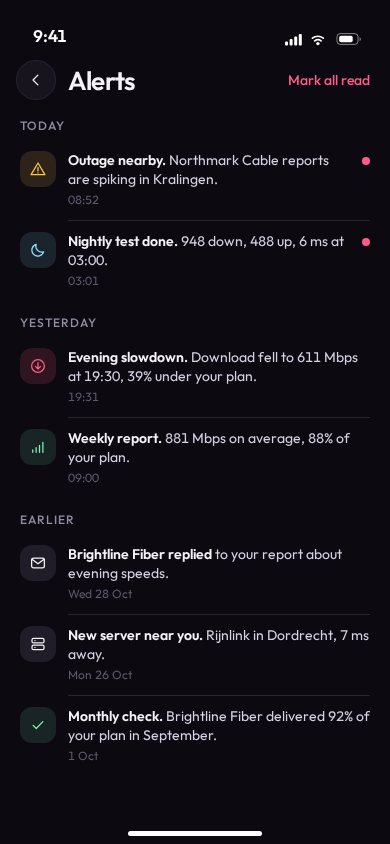
A list screen from Ping, an internet speed test app template in a Dark-first style. Screen 23 of 25.
Ping is a complete internet speed test app: welcome, location permission and sign in, a home with the GO gauge, live download and upload tests, a result with plan check, test details with latency ranges, results history and 30 day insights, server picker, a hex coverage map, provider rankings and a provider page, a video streaming test and its result, a Wi-Fi channel analyzer, a room by room signal finder, nearby outages, a report to your provider, a Plus plan with checkout, alerts, profile and settings. Plum black with signal rose, sodium amber and ice.
| Detail | Value |
|---|---|
| Screen type | List |
| App | Ping: Internet speed test |
| Category | Productivity |
| Design language | Dark-first, dark |
| Type | Outfit |
| Colours | #0c0a10 background, #17141d surface, #f6f2f8 text, #958da3 text-muted, #ff5c8a accent, #1a0a12 accent-contrast, #ffc24b secondary, #2a2533 border, #ff6b5b danger |
What this screen says
- Alerts
- Mark all read
- Today
- Outage nearby. Northmark Cable reports are spiking in Kralingen.
- Nightly test done. 948 down, 488 up, 6 ms at 03:00.
- Yesterday
- Evening slowdown. Download fell to 611 Mbps at 19:30, 39% under your plan.
- Weekly report. 881 Mbps on average, 88% of your plan.
- Earlier
- Brightline Fiber replied to your report about evening speeds.
- Wed 28 Oct
- New server near you. Rijnlink in Dordrecht, 7 ms away.
- Mon 26 Oct
- Monthly check. Brightline Fiber delivered 92% of your plan in September.
- 1 Oct
Around it in Ping
More list and feed screens
- Kanso Notifications: Tasks, calendar and chat
- Margin Notebooks: AI note taking
- Aide Notifications: Executive AI assistant
- Juno Models: AI chat assistant
- Opal Projects: Studio dashboard
- Jot Folders: Quick notes and checklists
- Chrono Alarms: World clock, timers and stopwatch
- Frontdesk Views: Customer support inbox
- Campaigns: Email marketing campaigns
- Outpost Calendar: Schedule social posts
- Pageview Reports: Website analytics
- Polish Documents: Writing assistant and keyboard
Every productivity app list screen
What makes a good list screen
- Show what people need to decide. Each row should carry just enough to choose: a title, one or two details and a status. Everything else belongs on the detail screen.
- Keep rows consistent. The same information in the same place on every row lets people scan down a column instead of reading each item.
- Group with headings. Dates, categories or status headings break long lists into chunks people can skip through.
- Make common actions quick. Swipe actions, a checkbox or a heart on the row save opening the item for small tasks.
The full list screen guide and every example
Remix Ping free: describe your own app and it is drawn in this design. Or get its files from $10: Figma, React Native, SwiftUI, Flutter and HTML.