Templates · Detail screens · Travel app · Permit
Permit Travel authorisation screen
A detail screen from Permit, a visas and travel documents wallet app template in a Clinical style. Screen 10 of 25.
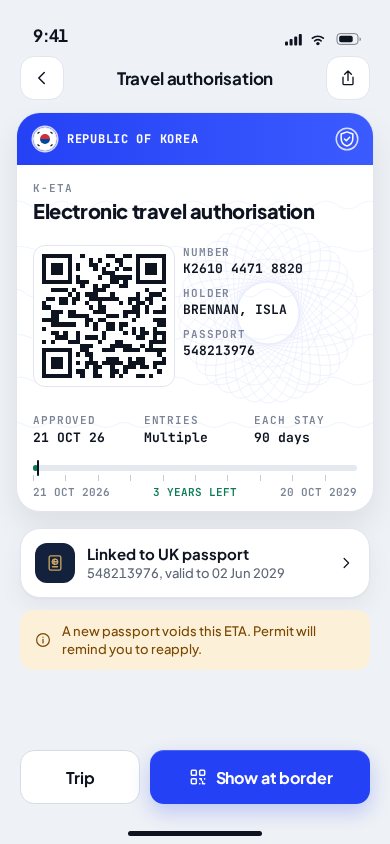
Permit is a complete travel documents wallet: welcome, sign in, a passport scan, a wallet of passports, visas and cards, the passport data page, every document, a trip with entry readiness per country, an entry requirements check and the rules for one country, a travel authorisation, an e-visa application with a compliant photo, review and pay and a submitted screen, live application status, a 90 in 180 day stay counter, a validity timeline, add a document, a secure share link, border mode, family passports, alerts, a Plus plan, profile and settings. Paper grey and white with cobalt, navy and quiet status colours.
| Detail | Value |
|---|---|
| Screen type | Detail |
| App | Permit: Visas and travel documents wallet |
| Category | Travel |
| Design language | Clinical, light |
| Type | JetBrains Mono for headings, Plus Jakarta Sans for text |
| Colours | #eef1f5 background, #ffffff surface, #0d1420 text, #5d6778 text-muted, #2541f5 accent, #ffffff accent-contrast, #14213d secondary, #e1e6ee border, #c42a30 danger, #0b7a55 success, #9a5a00 warning |
What this screen says
- Travel authorisation
- REPUBLIC OF KOREA
- K-ETA
- Electronic travel authorisation
- Number
- K2610 4471 8820
- Holder
- BRENNAN, ISLA
- Passport
- Approved
- 21 OCT 26
- Entries
- Multiple
- Each stay
- 90 days
- 21 OCT 2026 3 YEARS LEFT 20 OCT 2029
- Linked to UK passport
- 548213976, valid to 02 Jun 2029
- A new passport voids this ETA. Permit will remind you to reapply.
- Trip
- Show at border
Around it in Permit
More detail screens
- Piazza Tour: Self-guided city walking tours
- Fjord Port day: Cruise companion on board
- Atlas Place: Maps and navigation
- Kerb Street bay: Parking that reads like a road sign
- Linea Departures: City transit
- Hollow Stay: Cabin and boutique stays
- Aloft Flight: Flight tracker
- Pitch Campsite: Campsite booking and trip kit
- Hail Safety: Ride hailing
- Volta Station: EV charging
- Museo Exhibition: Museum guide
- Roamly Destination: Trips, stays and experiences
Every travel app detail screen
What makes a good detail screen
- Lead with what identifies the item. A large image or title, the price or status, and the key facts at the top. People should know they are in the right place at a glance.
- Keep the main action visible. A sticky bottom button for Add to cart, Book or Play stays reachable while people scroll through details.
- Order information by importance. The facts that decide the choice come first; reviews, specifications and fine print further down.
- Use progressive disclosure. Long descriptions, specifications and policies can expand on tap rather than filling the screen.
The full detail screen guide and every example
Remix Permit free: describe your own app and it is drawn in this design. Or get its files from $10: Figma, React Native, SwiftUI, Flutter and HTML.