Templates · Detail screens · Travel app · Fjord
Fjord Port day screen
A detail screen from Fjord, a cruise companion on board app template in a Dark-first style. Screen 6 of 25.
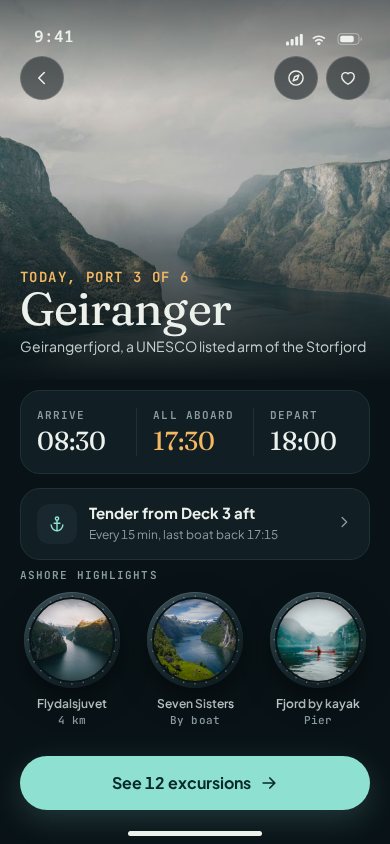
Fjord is a complete cruise companion: welcome, sign in with a booking reference, the safety drill, a today screen with the port, all aboard time and the day's plan, the itinerary on a nautical chart, port days, shore excursions with booking and a confirmation, a day planner, dining with a table reservation, a deck plan, the live voyage tracker, a bow camera, the onboard account, room service, Wi-Fi plans, the cabin, the cruise card, notifications, profile and settings. Fjord night slate with glacier mint and midnight sun amber.
| Detail | Value |
|---|---|
| Screen type | Detail |
| App | Fjord: Cruise companion on board |
| Category | Travel |
| Design language | Dark-first, dark |
| Type | Fraunces for headings, Plus Jakarta Sans for text |
| Colours | #091317 background, #111e23 surface, #edf1ec text, #8b9ea3 text-muted, #8ee0d1 accent, #062a26 accent-contrast, #f5b862 secondary, #1f3138 border, #ff7a6b danger |
What this screen says
- Today, port 3 of 6
- Geiranger
- Geirangerfjord, a UNESCO listed arm of the Storfjord
- Arrive
- All aboard
- Depart
- Tender from Deck 3 aftEvery 15 min, last boat back 17:15
- Ashore highlights
- Flydalsjuvet
- 4 km
- Seven Sisters
- By boat
- Fjord by kayak
- Pier
- See 12 excursions
Around it in Fjord
More detail screens
- Hollow Stay: Cabin and boutique stays
- Aloft Flight: Flight tracker
- Pitch Campsite: Campsite booking and trip kit
- Hail Safety: Ride hailing
- Volta Station: EV charging
- Museo Exhibition: Museum guide
- Roamly Destination: Trips, stays and experiences
- Jaunt Destination: Bus, train and flight booking
- Spoke Station: Bike sharing
- Navara Yacht: Yacht charter
- Voya Trip: Travel booking
- Wheelhouse Trip request: Driver app for ride hailing
Every travel app detail screen
What makes a good detail screen
- Lead with what identifies the item. A large image or title, the price or status, and the key facts at the top. People should know they are in the right place at a glance.
- Keep the main action visible. A sticky bottom button for Add to cart, Book or Play stays reachable while people scroll through details.
- Order information by importance. The facts that decide the choice come first; reviews, specifications and fine print further down.
- Use progressive disclosure. Long descriptions, specifications and policies can expand on tap rather than filling the screen.
The full detail screen guide and every example
Remix Fjord free: describe your own app and it is drawn in this design. Or get its files from $10: Figma, React Native, SwiftUI, Flutter and HTML.