Templates · Detail screens · Travel app · Hail
Hail Safety screen
A detail screen from Hail, a ride hailing app template in a Minimal style. Screen 13 of 25.
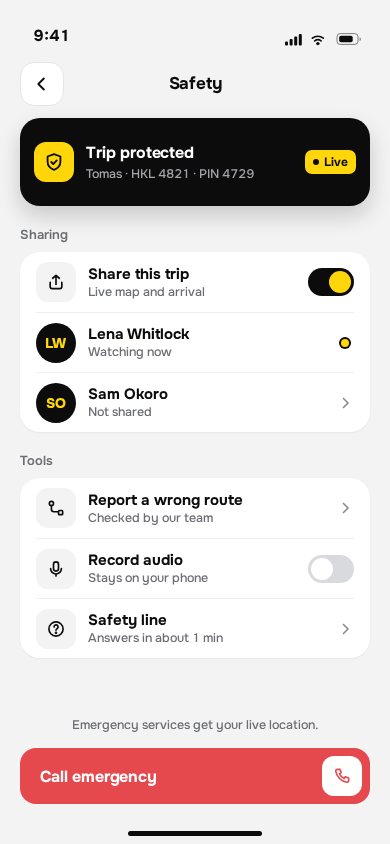
Hail is a complete ride hailing app: welcome, phone sign in and code, a map home with saved places, destination search, setting the pickup pin, choosing a ride, scheduling, matching, the driver on the way, messages, the trip itself, safety tools, arrival with rating and tip, the receipt, ride history, scheduled rides, saved places, a wallet with funds and cards, a pass, monthly stats, notifications, account and settings. One taxi yellow for whatever is selected, live or yours.
| Detail | Value |
|---|---|
| Screen type | Detail |
| App | Hail: Ride hailing |
| Category | Travel |
| Design language | Minimal, light |
| Type | Onest |
| Colours | #f3f3f4 background, #ffffff surface, #0c0c0d text, #6b6d73 text-muted, #ffd60a accent, #0c0c0d accent-contrast, #e9eaec secondary, #e4e5e8 border, #e5484d danger |
What this screen says
- Safety
- Trip protected
- Tomas · HKL 4821 · PIN 4729
- Live
- Sharing
- Share this trip
- Live map and arrival
- LW
- Lena Whitlock
- Watching now
- SO
- Sam Okoro
- Not shared
- Tools
- Report a wrong route
- Checked by our team
- Record audio
- Stays on your phone
- Safety line
- Answers in about 1 min
- Emergency services get your live location.
- Call emergency
Around it in Hail
More detail screens
- Museo Exhibition: Museum guide
- Roamly Destination: Trips, stays and experiences
- Jaunt Destination: Bus, train and flight booking
- Spoke Station: Bike sharing
- Navara Yacht: Yacht charter
- Voya Trip: Travel booking
- Wheelhouse Trip request: Driver app for ride hailing
- Fuelup Station: Pay at the pump and car wash
- Omnia Restaurant: Super app for rides, food and payments
- Staya Listing: Homes and stays from local hosts
- Lodge Hotel: Hotels, deals and reservations
- Fare Flight: Flight search and price alerts
Every travel app detail screen
What makes a good detail screen
- Lead with what identifies the item. A large image or title, the price or status, and the key facts at the top. People should know they are in the right place at a glance.
- Keep the main action visible. A sticky bottom button for Add to cart, Book or Play stays reachable while people scroll through details.
- Order information by importance. The facts that decide the choice come first; reviews, specifications and fine print further down.
- Use progressive disclosure. Long descriptions, specifications and policies can expand on tap rather than filling the screen.
The full detail screen guide and every example
Remix Hail free: describe your own app and it is drawn in this design. Or get its files from $10: Figma, React Native, SwiftUI, Flutter and HTML.