Templates · Form and input screens · Travel app · Keycard
Keycard Check in screen
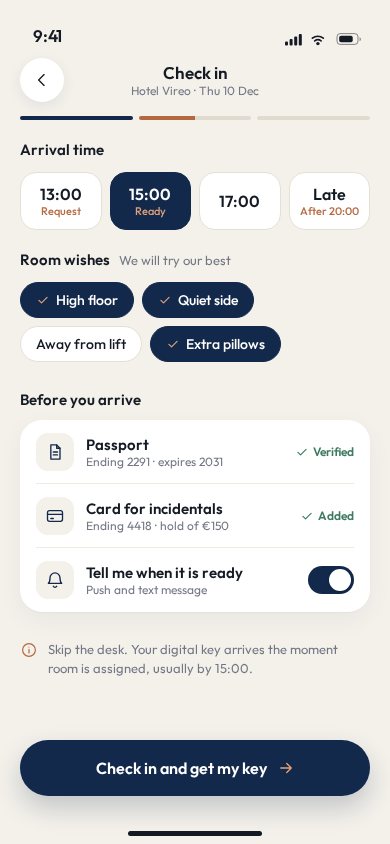
A form screen from Keycard, a travel app template in a Luxury style. Screen 12 of 25.
Keycard is a complete hotel stay app: welcome, sign in, a home built around the stay you are in, search, results, a hotel page, room rates, booking review and confirmation, your stays, a stay with its details, mobile check in, a digital room key, in room dining with a dish, an order and live order status, a chat with the front desk, housekeeping requests, the bill, rewards with elite status, a paid Reserve membership, notifications, profile and settings. Linen and white with harbour navy and burnished copper.
| Detail | Value |
|---|---|
| Screen type | Form |
| App | Keycard: Hotel stays, digital key and room service |
| Category | Travel |
| Design language | Luxury, light |
| Type | Instrument Serif for headings, Outfit for text |
| Colours | #f4f1eb background, #ffffff surface, #141a24 text, #737785 text-muted, #b5683f accent, #ffffff accent-contrast, #13294b secondary, #e5e0d6 border, #c0432f danger |
What this screen says
- Check inHotel Vireo · Thu 10 Dec
- Arrival time
- 13:00Request 15:00Ready 17:00 LateAfter 20:00
- Room wishes We will try our best
- High floor Quiet side Away from lift Extra pillows
- Before you arrive
- Passport
- Ending 2291 · expires 2031
- Verified
- Card for incidentals
- Ending 4418 · hold of €150
- Added
- Tell me when it is ready
- Push and text message
- Skip the desk. Your digital key arrives the moment room is assigned, usually by 15:00.
- Check in and get my key
Around it in Keycard
More form and input screens
- Atlas Add a review: Maps and navigation
- Hollow Guests: Cabin and boutique stays
- Aloft Check in: Flight tracker
- Hail Set pickup: Ride hailing
- Volta Filters: EV charging
- Roamly Filters: Trips, stays and experiences
- Jaunt Filters: Bus, train and flight booking
- Spoke End ride: Bike sharing
- Wheelhouse Messages: Driver app for ride hailing
- Fuelup Pick a pump: Pay at the pump and car wash
- Omnia Rate trip: Super app for rides, food and payments
- Staya Dates: Homes and stays from local hosts
What makes a good form screen
- Ask only what you need. Every field is a reason to stop. Remove optional fields or move them to later.
- Labels above fields. Visible labels stay readable while people type; placeholder-only labels disappear.
- Use the right keyboard and input. Number pads for amounts, email keyboards for email, pickers for dates and autofill for addresses and codes.
- Validate as people go. Show problems next to the field when people leave it, in words that say how to fix them.
The full form screen guide and every example
Remix Keycard free: describe your own app and it is drawn in this design. Or get its files from $10: Figma, React Native, SwiftUI, Flutter and HTML.