Templates · Booking and checkout screens · Finance app · Payday
Payday Approve payroll screen
A checkout screen from Payday, a payroll for small teams app template in an Enterprise style. Screen 7 of 25.
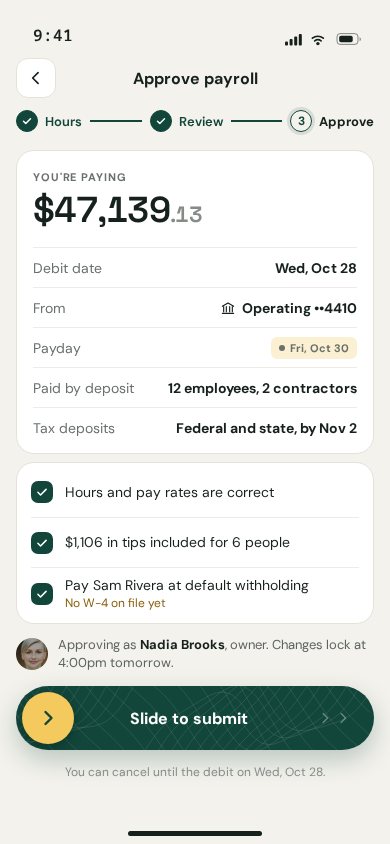
Payday is a complete payroll app for a small team: welcome, sign in and a code check, a company home with the next pay run, entering hours, a review with a cost breakdown, a slide to submit approval and a submitted timeline, pay run history and detail, a perforated pay stub, the team list, an employee record, adding an employee or contractor, time off requests with an approval view, benefits and a retirement plan, tax filings and a filed return, cost reports, plans, notifications, the company profile and settings. Warm paper and white with deep spruce, gold and cheque guilloche lines.
| Detail | Value |
|---|---|
| Screen type | Checkout |
| App | Payday: Payroll for small teams |
| Category | Finance |
| Design language | Enterprise, light |
| Type | Space Grotesk for headings, DM Sans for text |
| Colours | #f3f2ec background, #ffffff surface, #16201c text, #6a716c text-muted, #12463a accent, #ffffff accent-contrast, #f4c95d secondary, #e4e2d9 border, #c8442f danger |
What this screen says
- Approve payroll
- Hours Review 3Approve
- You're paying
- Debit date Wed, Oct 28
- From Operating ••4410
- Payday Fri, Oct 30
- Paid by deposit 12 employees, 2 contractors
- Tax deposits Federal and state, by Nov 2
- Hours and pay rates are correct
- $1,106 in tips included for 6 people
- Pay Sam Rivera at default withholdingNo W-4 on file yet
- Approving as Nadia Brooks, owner. Changes lock at 4:00pm tomorrow.
- Slide to submit
- You can cancel until the debit on Wed, Oct 28.
Around it in Payday
More booking and checkout screens
- Later Checkout: Buy now, pay in four
- Standing Apply: Credit score and reports
- Accrue Review transfer: Retirement and pension planner
- Levy Pay estimate: Taxes for freelancers
- Bullion Review order: Gold and silver savings
- Wage Review: Get paid as you work
- Keystone Review payment: Mortgage and home loan tracker
- Rebate Review: Cashback card and rewards
- Aegis Review claim: Insurance policies and claims
- Till Cart: Card reader and sales for small shops
- Strike Review order: Options trading
- Folio Review order: Stocks and ETF investing
Every finance app checkout screen
What makes a good checkout screen
- Show the total early and honestly. Taxes, delivery and service fees should appear before the last step. A higher total on the final screen feels like a trick.
- Offer wallet payments. Apple Pay and Google Pay skip card typing entirely. Show them first when they are available.
- Ask for the minimum. Only the fields needed to deliver or book. Save details for next time.
- Let people review before paying. A clear summary of items, dates, address and price, with each part editable without starting over.
The full checkout screen guide and every example
Remix Payday free: describe your own app and it is drawn in this design. Or get its files from $10: Figma, React Native, SwiftUI, Flutter and HTML.