Templates · Success and confirmation screens · Food app · Nosh
Nosh Review posted screen
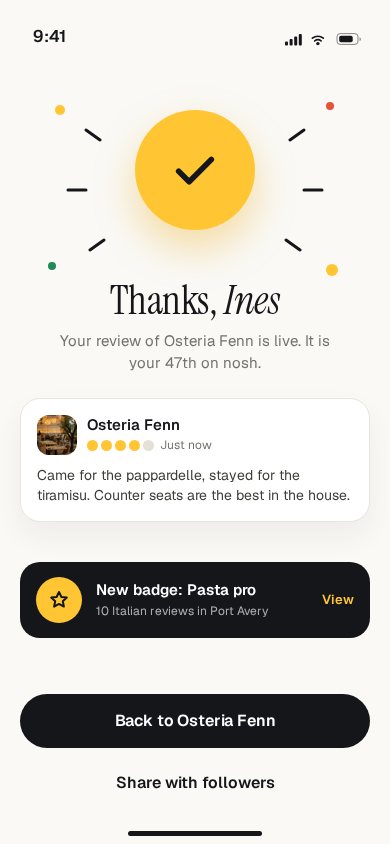
A success screen from Nosh, a local restaurant reviews app template in a Minimal style. Screen 14 of 25.
Nosh is a complete local restaurant reviews app: welcome, taste picks, sign in, a home with nearby picks and categories, search, results with photo strips, a map with score pins, a restaurant page with booking slots, the menu, a photo viewer, reviews with a score histogram, a single review with the owner reply, writing a review, booking a table with confirmation and a ticket, a live waitlist, saved lists, a friends feed, a year in food, notifications, a Plus plan, profile and settings. Warm paper and white with ink and saffron.
| Detail | Value |
|---|---|
| Screen type | Success |
| App | Nosh: Local restaurant reviews |
| Category | Food |
| Design language | Minimal, light |
| Type | Instrument Serif for headings, Geist for text |
| Colours | #faf9f6 background, #ffffff surface, #15161a text, #74726b text-muted, #ffc533 accent, #15161a accent-contrast, #fff3cf secondary, #e8e5dd border, #e5533a danger |
What this screen says
- Thanks, Ines
- Your review of Osteria Fenn is live. It is your 47th on nosh.
- Osteria Fenn Just now
- Came for the pappardelle, stayed for the tiramisu. Counter seats are the best in the house.
- New badge: Pasta pro10 Italian reviews in Port Avery
- View
- Back to Osteria Fenn
- Share with followers
Around it in Nosh
More success and confirmation screens
- Rescue Reserved: Surprise bags of surplus food
- Omakase Confirmed: Chef's counter reservations
- Lunchbox Order placed: School lunch planner for parents
- Agave Order placed: Cocktails and home bar
- Crock At peak: Fermentation and sourdough starter log
- Curbside Order placed: Street food and food truck finder
- Forage Order placed: Farmers market and veg box
- Ember Cook complete: Smoker and grill thermometer
- Steep Note saved: Tea brewing and tasting notes
- Brigade Order sent: Restaurant kitchen and line ops
- Nibs Order placed: Food allergy and label scanner
- Ladle Cooked: Recipes and meal planning
What makes a good confirmation screen
- Confirm in the headline. "Payment sent", "Table booked for Friday at 8" or "Lesson complete" in plain words, with a clear success colour or icon.
- Repeat the key details. Amount, date, reference number or score, so people do not need to check elsewhere that the right thing happened.
- Say what happens next. When the order arrives, when the money lands, when the next lesson unlocks.
- Offer the next step. Track the order, add to calendar, share, or start the next lesson. One primary action and a way back home.
The full confirmation screen guide and every example
Remix Nosh free: describe your own app and it is drawn in this design. Or get its files from $10: Figma, React Native, SwiftUI, Flutter and HTML.