Templates · Onboarding screens · Social app · Ballot
Ballot Welcome screen
An onboarding screen from Ballot, a settle it on paper app template in a Brutalist style. Screen 1 of 25.
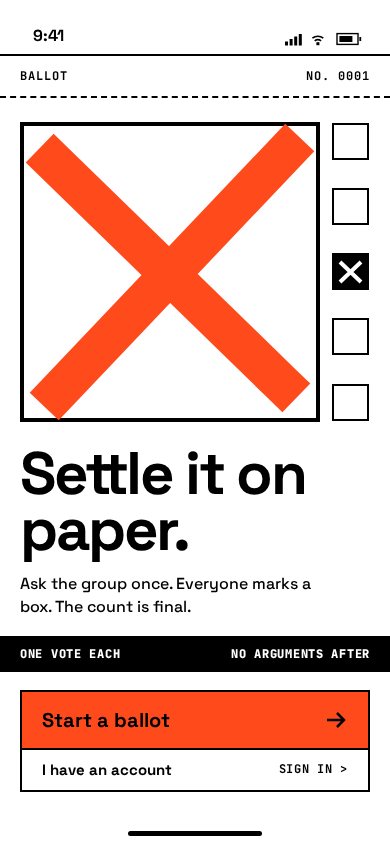
Ballot is ballot settles where to eat and when to meet. It covers making a poll with options and a closing time, inviting voters, marking one box or ranking choices, live results with huge percentages, ranked count rounds, groups, an archive of closed polls, stats, notifications and a Ballot Plus plan.
| Detail | Value |
|---|---|
| Screen type | Onboarding |
| App | Ballot: Settle it on paper |
| Category | Social |
| Design language | Brutalist, light |
| Type | Space Grotesk |
| Colours | #ffffff background, #ffffff surface, #000000 text, #6b6b6b text-muted, #ff4a1c accent, #000000 accent-contrast, #000000 border |
What this screen says
- BALLOT NO. 0001
- Settle it on paper.
- Ask the group once. Everyone marks a box. The count is final.
- ONE VOTE EACH NO ARGUMENTS AFTER
- Start a ballot
- I have an account SIGN IN >
Around it in Ballot
More onboarding screens
- Quorum Welcome: Questions and expert answers
- Backer Welcome: Support creators with memberships
- Pledge Welcome: Back creative projects
- Civic Welcome: Report issues and city services
- Guild Welcome: Community servers with voice and text chat
- Parrot Welcome: Private messaging, groups and calls
- Carrier Welcome: Cloud messaging with channels
- Vista Welcome: Photos, stories and reels
- Flick Welcome: Short video feed
- Squawk Welcome: Short posts and live conversation
- Agora Welcome: Communities, threads and votes
- Spark Welcome: Swipe dating
Every social app onboarding screen
What makes a good onboarding screen
- One idea per screen. Each screen should say one thing in a headline people can read in a second. If a screen needs a paragraph, it is doing too much.
- Personalise with a purpose. Ask a question only if the answer changes what people see next, like a goal, a level or an interest. Then show that the answer mattered.
- Explain permissions before asking. Show your own screen saying why you need notifications, location or the camera before the system prompt. People who understand the reason are more likely to allow it.
- Let people skip. A visible skip or "I'll do this later" respects returning users and the impatient. Make sure skipping still lands them somewhere useful.
The full onboarding screen guide and every example
Remix Ballot free: describe your own app and it is drawn in this design. Or get its files from $10: Figma, React Native, SwiftUI, Flutter and HTML.