Templates · Success and confirmation screens · Lifestyle app · Natal
Natal Reading booked screen
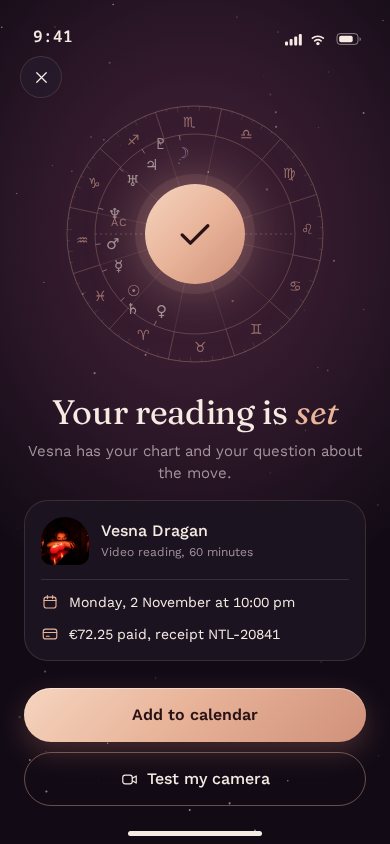
A success screen from Natal, a birth charts and daily astrology app template in a Luxury style. Screen 20 of 25.
Natal is a complete astrology app: welcome, birth details and sign in, a daily reading with the moon and today's transits, a full birth chart wheel, a placement page, an aspect grid, transits and a transit page, a cosmic calendar, a live moon tracker, friends and a synastry match, a journal with a new entry and mood patterns against the moon, a marketplace of astrologers with a profile, booking, confirmation and a live video reading, a Luminary plan, notifications, profile and settings. Aubergine and rosé copper with lilac moonlight.
| Detail | Value |
|---|---|
| Screen type | Success |
| App | Natal: Birth charts and daily astrology |
| Category | Lifestyle |
| Design language | Luxury, dark |
| Type | Fraunces for headings, Work Sans for text |
| Colours | #120b16 background, #1c1320 surface, #f5ebe3 text, #a3929d text-muted, #e8b49a accent, #2a1216 accent-contrast, #c3b1e1 secondary, #3a2a38 border, #e5737c danger |
What this screen says
- Your reading is set
- Vesna has your chart and your question about the move.
- Vesna DraganVideo reading, 60 minutes
- Monday, 2 November at 10:00 pm
- €72.25 paid, receipt NTL-20841
- Add to calendar
- Test my camera
Around it in Natal
More success and confirmation screens
- Drizzle Welcome to Plus: Weather with living skies
- Byline Puzzle solved: Daily news reader
- Shelf Book finished: Reading tracker and book club
- Marquee Booked: Cinema tickets and watchlist
- Handy Booking placed: Home services
- Tasker Booked: Book and do local odd jobs
- Toolbox Order placed: Hardware store and project lists
- Brief Quiz done: News in sixty words
- Kibble Order placed: Pet supplies and autoship
- Filmlog Logged: Film diary and reviews
- Guardrail Approved: Parental controls and screen time
- Collar Walk saved: GPS pet tracker
Every lifestyle app success screen
What makes a good confirmation screen
- Confirm in the headline. "Payment sent", "Table booked for Friday at 8" or "Lesson complete" in plain words, with a clear success colour or icon.
- Repeat the key details. Amount, date, reference number or score, so people do not need to check elsewhere that the right thing happened.
- Say what happens next. When the order arrives, when the money lands, when the next lesson unlocks.
- Offer the next step. Track the order, add to calendar, share, or start the next lesson. One primary action and a way back home.
The full confirmation screen guide and every example
Remix Natal free: describe your own app and it is drawn in this design. Or get its files from $10: Figma, React Native, SwiftUI, Flutter and HTML.