Templates · Form and input screens · Food app · Menu
Menu Split bill screen
A form screen from Menu, a food app template in a Minimal style. Screen 15 of 25.
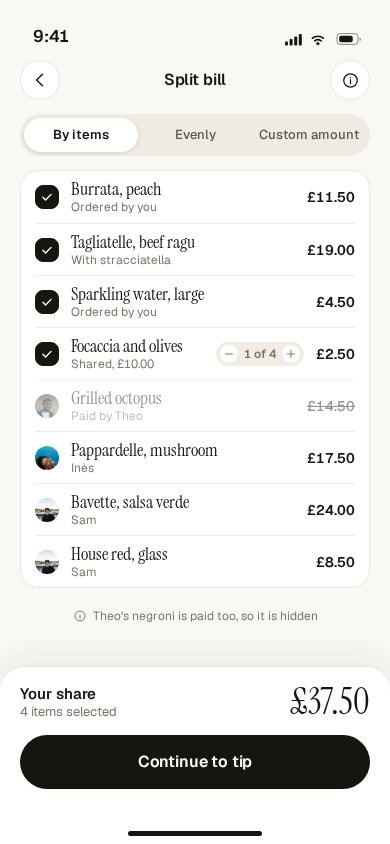
Menu is a complete scan, order and pay app: welcome, a camera that reads the table code, sign in, a table home with who has joined and what the kitchen is doing, a printed style menu, search with allergen filters, a dish with options and a note for the kitchen, the table's shared order, live order status, calling a server, the bill, splitting by items, tip, pay, a receipt, rewards, past visits, a Plus plan, notifications, profile and settings. Paper white and ink with tomato red and sage.
| Detail | Value |
|---|---|
| Screen type | Form |
| App | Menu: Scan, order and pay at the table |
| Category | Food |
| Design language | Minimal, light |
| Type | Instrument Serif for headings, Geist for text |
| Colours | #faf8f4 background, #ffffff surface, #16150f text, #7a766c text-muted, #e4522e accent, #ffffff accent-contrast, #3f6f55 secondary, #ebe7de border, #d93b2b danger |
What this screen says
- Split bill
- By itemsEvenlyCustom amount
- Burrata, peach
- Ordered by you
- £11.50
- Tagliatelle, beef ragu
- With stracciatella
- £19.00
- Sparkling water, large
- £4.50
- Focaccia and olives
- Shared, £10.00
- 1 of 4 £2.50
- Grilled octopus
- Paid by Theo
- £14.50
- Pappardelle, mushroom
- Inès
- £17.50
- Bavette, salsa verde
- Sam
- £24.00
- House red, glass
- £8.50
- Theo's negroni is paid too, so it is hidden
- Your share4 items selected £37.50
- Continue to tip
Around it in Menu
More form and input screens
- Rescue Set location: Surprise bags of surplus food
- Omakase Guests and notes: Chef's counter reservations
- Lunchbox Build a box: School lunch planner for parents
- Agave Add bottle: Cocktails and home bar
- Crock Feed: Fermentation and sourdough starter log
- Curbside Write review: Street food and food truck finder
- Forage Swap items: Farmers market and veg box
- Ember Alerts: Smoker and grill thermometer
- Steep Brew setup: Tea brewing and tasting notes
- Brigade New prep task: Restaurant kitchen and line ops
- Nibs Add member: Food allergy and label scanner
- Ladle Add a meal: Recipes and meal planning
What makes a good form screen
- Ask only what you need. Every field is a reason to stop. Remove optional fields or move them to later.
- Labels above fields. Visible labels stay readable while people type; placeholder-only labels disappear.
- Use the right keyboard and input. Number pads for amounts, email keyboards for email, pickers for dates and autofill for addresses and codes.
- Validate as people go. Show problems next to the field when people leave it, in words that say how to fix them.
The full form screen guide and every example
Remix Menu free: describe your own app and it is drawn in this design. Or get its files from $10: Figma, React Native, SwiftUI, Flutter and HTML.