Templates · Form and input screens · Food app · Curbside
Curbside Write review screen
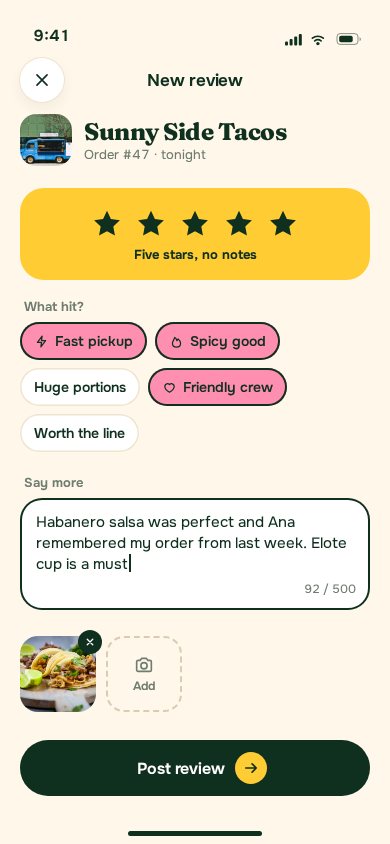
A form screen from Curbside, a food app template in a Gen Z style. Screen 15 of 25.
Curbside is a complete food truck app: welcome, cravings, sign in, a home with trucks parked near you, a live map, search, truck pages with menus and dishes, a cart, pickup checkout and an order ticket, live order status, following a truck on the move, reviews, a saved list, the weekly parking schedule, a night market, video drops, taste stats, order history, a Curbside Pass plan, notifications, profile and settings. Warm paper, pickle green and mustard, with pink striped awnings.
| Detail | Value |
|---|---|
| Screen type | Form |
| App | Curbside: Street food and food truck finder |
| Category | Food |
| Design language | Gen Z, light |
| Type | Fraunces for headings, Onest for text |
| Colours | #fff7ea background, #ffffff surface, #10301f text, #6f7d70 text-muted, #ffcc33 accent, #10301f accent-contrast, #ff8fb1 secondary, #efe4cf border, #ff5436 danger |
What this screen says
- New review
- Sunny Side Tacos
- Order #47 · tonight
- Five stars, no notes
- What hit?
- Fast pickup Spicy good Huge portions Friendly crew Worth the line
- Say more
- Habanero salsa was perfect and Ana remembered my order from last week. Elote cup is a must92 / 500
- Add
- Post review
Around it in Curbside
More form and input screens
- Agave Add bottle: Cocktails and home bar
- Crock Feed: Fermentation and sourdough starter log
- Forage Swap items: Farmers market and veg box
- Ember Alerts: Smoker and grill thermometer
- Steep Brew setup: Tea brewing and tasting notes
- Brigade New prep task: Restaurant kitchen and line ops
- Nibs Add member: Food allergy and label scanner
- Ladle Add a meal: Recipes and meal planning
- Pantry Delivery address: Grocery delivery
- Brewly Customise: Coffee ordering and loyalty
- Tabla Filters: Tables worth dressing for
- Corked Tasting note: Wine journal and cellar
What makes a good form screen
- Ask only what you need. Every field is a reason to stop. Remove optional fields or move them to later.
- Labels above fields. Visible labels stay readable while people type; placeholder-only labels disappear.
- Use the right keyboard and input. Number pads for amounts, email keyboards for email, pickers for dates and autofill for addresses and codes.
- Validate as people go. Show problems next to the field when people leave it, in words that say how to fix them.
The full form screen guide and every example
Remix Curbside free: describe your own app and it is drawn in this design. Or get its files from $10: Figma, React Native, SwiftUI, Flutter and HTML.