Templates · Booking and checkout screens · Food app · Menu
Menu Bill screen
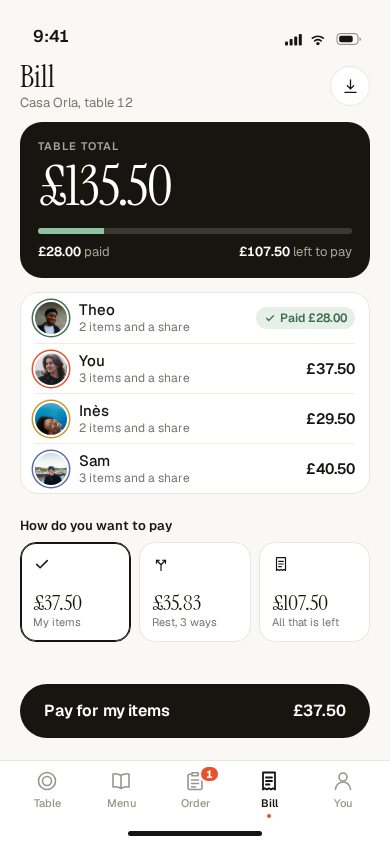
A checkout screen from Menu, a food app template in a Minimal style. Screen 14 of 25.
Menu is a complete scan, order and pay app: welcome, a camera that reads the table code, sign in, a table home with who has joined and what the kitchen is doing, a printed style menu, search with allergen filters, a dish with options and a note for the kitchen, the table's shared order, live order status, calling a server, the bill, splitting by items, tip, pay, a receipt, rewards, past visits, a Plus plan, notifications, profile and settings. Paper white and ink with tomato red and sage.
| Detail | Value |
|---|---|
| Screen type | Checkout |
| App | Menu: Scan, order and pay at the table |
| Category | Food |
| Design language | Minimal, light |
| Type | Instrument Serif for headings, Geist for text |
| Colours | #faf8f4 background, #ffffff surface, #16150f text, #7a766c text-muted, #e4522e accent, #ffffff accent-contrast, #3f6f55 secondary, #ebe7de border, #d93b2b danger |
What this screen says
- Bill
- Casa Orla, table 12
- Table total
- £135.50
- £28.00 paid £107.50 left to pay
- Theo2 items and a share
- Paid £28.00
- You3 items and a share
- £37.50
- Inès2 items and a share
- £29.50
- Sam3 items and a share
- £40.50
- How do you want to pay
- £37.50My items
- £35.83Rest, 3 ways
- £107.50All that is left
- Pay for my items £37.50
- Table
- Menu
- Order1
- You
Around it in Menu
More booking and checkout screens
- Pantry Cart: Grocery delivery
- Brewly Bag: Coffee ordering and loyalty
- Tabla Book a table: Tables worth dressing for
- Corked Cart: Wine journal and cellar
- Crumb Preorder: Neighbourhood bakery
- Tiffin Cart: Food delivery
- Courier Cash out: Food delivery driver app
- Picker Order review: Grocery shopper app
- Queue Review: Join the waitlist from anywhere
- Nosh Reserve: Local restaurant reviews
- Buns Bag: Burger chain ordering and deals
- Slice Cart: Pizza ordering with a live tracker
Every food app checkout screen
What makes a good checkout screen
- Show the total early and honestly. Taxes, delivery and service fees should appear before the last step. A higher total on the final screen feels like a trick.
- Offer wallet payments. Apple Pay and Google Pay skip card typing entirely. Show them first when they are available.
- Ask for the minimum. Only the fields needed to deliver or book. Save details for next time.
- Let people review before paying. A clear summary of items, dates, address and price, with each part editable without starting over.
The full checkout screen guide and every example
Remix Menu free: describe your own app and it is drawn in this design. Or get its files from $10: Figma, React Native, SwiftUI, Flutter and HTML.