Templates · Detail screens · Smart home app · Lumen
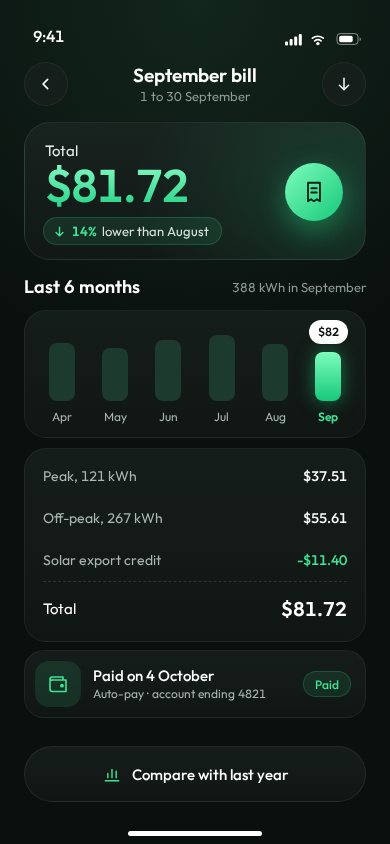
Lumen Bill screen
A detail screen from Lumen, a smart home energy app template in a Dark-first style. Screen 22 of 25.
Lumen is a complete smart home app built around energy: welcome, sign in, a code and home setup, a home with quick actions and device cards, rooms, a room with a thermostat dial, every device, light and speaker controls, pairing a device, scenes and schedules, live energy analytics, usage per device, solar and battery flow, savings, a monthly budget, the bill, a Plus plan, profile and settings. One mint green for everything that is on, saving or selected.
| Detail | Value |
|---|---|
| Screen type | Detail |
| App | Lumen: Smart home energy |
| Category | Smart home |
| Design language | Dark-first, dark |
| Type | Outfit |
| Colours | #0a100e background, #131a17 surface, #ffffff text, #8b9a93 text-muted, #3ee594 accent, #052016 accent-contrast, #12b76a secondary, #222b27 border, #ff6b6b danger |
What this screen says
- September bill
- 1 to 30 September
- Total
- 14% lower than August
- Last 6 months
- 388 kWh in September
- Apr
- May
- Jun
- Jul
- Aug
- $82Sep
- Peak, 121 kWh$37.51
- Off-peak, 267 kWh$55.61
- Solar export credit-$11.40
- Total$81.72
- Paid on 4 October
- Auto-pay · account ending 4821
- Paid
- Compare with last year
Around it in Lumen
More detail screens
- Dusk Scenario: Smart home scenarios
- Abode Room: Smart home devices
- Boxed Room: Book movers and plan moving day
- Meter Tariff: Your energy supplier account
- Couch Title: TV remote, casting and watchlist
- Chime Answer: Voice assistant and smart speaker
- Latch Front door: Smart locks and guest access
- Mesh Node: Home Wi-Fi network
- Decibel Room: Multi-room speakers
- Nursery Clip: Baby monitor camera and sleep
- Porch Alert: Home security cameras
- Sundial Battery: Solar panels and home battery
Every smart home app detail screen
What makes a good detail screen
- Lead with what identifies the item. A large image or title, the price or status, and the key facts at the top. People should know they are in the right place at a glance.
- Keep the main action visible. A sticky bottom button for Add to cart, Book or Play stays reachable while people scroll through details.
- Order information by importance. The facts that decide the choice come first; reviews, specifications and fine print further down.
- Use progressive disclosure. Long descriptions, specifications and policies can expand on tap rather than filling the screen.
The full detail screen guide and every example
Remix Lumen free: describe your own app and it is drawn in this design. Or get its files from $10: Figma, React Native, SwiftUI, Flutter and HTML.