Templates · Detail screens · Smart home app · Mesh
Mesh Node screen
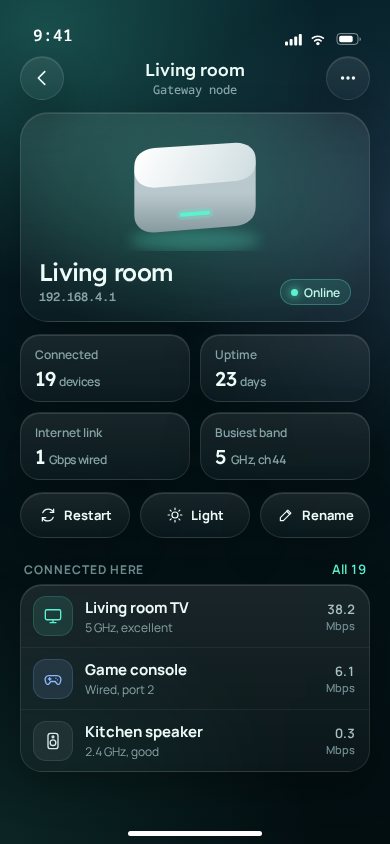
A detail screen from Mesh, a home Wi-Fi network app template in a Glass style. Screen 6 of 25.
Mesh is a complete home Wi-Fi app: welcome, sign in and a code, a home with network health, a live topology map, node details, every connected device with usage, search, family profiles with pause and bedtime schedules, a guest network to share, a live speed test with history, security and ad blocking, adding a node with placement guidance, notifications, a Shield plan with checkout, account and settings. Deep petrol glass with aqua and ice blue.
| Detail | Value |
|---|---|
| Screen type | Detail |
| App | Mesh: Home Wi-Fi network |
| Category | Smart home |
| Design language | Glass, dark |
| Type | Lexend for headings, Manrope for text |
| Colours | #041419 background, #12282e surface, #eefcf9 text, #86a3a6 text-muted, #5cf2cf accent, #03211c accent-contrast, #8fb6ff secondary, #22393e border, #ff7a85 danger |
What this screen says
- Living roomGateway node
- Living room
- Online
- Connected
- 19devices
- Uptime
- 23days
- Internet link
- 1Gbps wired
- Busiest band
- 5GHz, ch 44
- Restart
- Light
- Rename
- Connected here
- All 19
- Living room TV
- 5 GHz, excellent
- 38.2Mbps
- Game console
- Wired, port 2
- 6.1Mbps
- Kitchen speaker
- 2.4 GHz, good
- 0.3Mbps
Around it in Mesh
More detail screens
- Latch Front door: Smart locks and guest access
- Decibel Room: Multi-room speakers
- Nursery Clip: Baby monitor camera and sleep
- Porch Alert: Home security cameras
- Sundial Battery: Solar panels and home battery
- Puddle Zone: Garden watering and sprinklers
- Upkeep Task: Home maintenance calendar
- Kelvin Living room: Climate and thermostat
- Glow Bedroom: Light scenes and colour
- Tagged Living room: Home inventory for insurance
- Lobby Door key: Apartment building app
- Sweep Room: Robot vacuum and mop
Every smart home app detail screen
What makes a good detail screen
- Lead with what identifies the item. A large image or title, the price or status, and the key facts at the top. People should know they are in the right place at a glance.
- Keep the main action visible. A sticky bottom button for Add to cart, Book or Play stays reachable while people scroll through details.
- Order information by importance. The facts that decide the choice come first; reviews, specifications and fine print further down.
- Use progressive disclosure. Long descriptions, specifications and policies can expand on tap rather than filling the screen.
The full detail screen guide and every example
Remix Mesh free: describe your own app and it is drawn in this design. Or get its files from $10: Figma, React Native, SwiftUI, Flutter and HTML.