Templates · Form and input screens · Social app · Linkup
Linkup New post screen
A form screen from Linkup, a professional network and jobs app template in an Enterprise style. Screen 6 of 25.
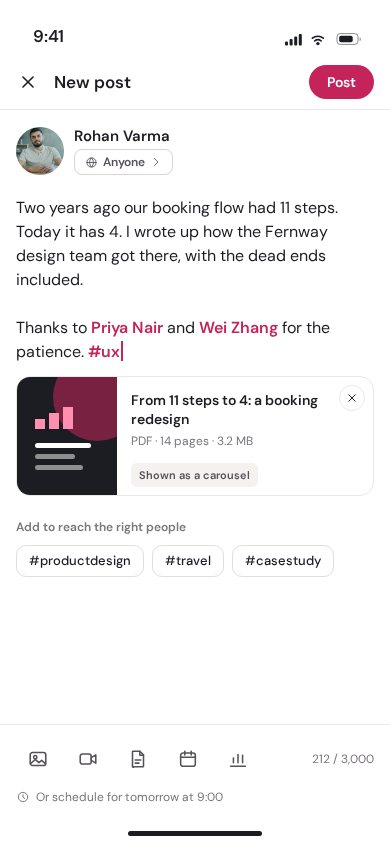
Linkup is a complete professional network: welcome, goals and sign in, a home feed of posts with reactions, a post with its comments, writing a post, your profile with experience, another member's profile, skills with endorsements, my network with invitations, people search, jobs with recommendations and filtered results, a job with a quick apply flow, review and confirmation, an applications tracker, messages and a conversation, notifications, who viewed your profile, a company page, a Pro plan and settings. Warm white and graphite with a single raspberry.
| Detail | Value |
|---|---|
| Screen type | Form |
| App | Linkup: Professional network and jobs |
| Category | Social |
| Design language | Enterprise, light |
| Type | Bricolage Grotesque for headings, DM Sans for text |
| Colours | #f6f5f3 background, #ffffff surface, #1c1d22 text, #7a767c text-muted, #c4245a accent, #fbe6ee accent-tint, #1c1d22 secondary, #f0a43a highlight, #ebe7e3 border, #2f8f6a success |
What this screen says
- New postPost
- Rohan Varma Anyone
- Two years ago our booking flow had 11 steps. Today it has 4. I wrote up how the Fernway design team got there, with...
- Thanks to Priya Nair and Wei Zhang for the patience. #ux
- From 11 steps to 4: a booking redesignPDF · 14 pages · 3.2 MB Shown as a carousel
- Add to reach the right people
- #productdesign #travel #casestudy
- Or schedule for tomorrow at 9:00
Around it in Linkup
More form and input screens
- Facet Call link: Video calls with family and friends
- Stoop New post: Neighbourhood noticeboard
- Aura Drop a mood: Moods with close friends
- Kindly Log hours: Volunteering near you
- Cohort Request intro: Alumni and mentor network
- Kin New moment: Private family circle
- Confetti RSVP: Party invites and RSVPs
- Ripple Edit note: Voice notes social
- Duo Daily question: An app for two
- Soapbox Write a take: Weekly debates and polls
- Ballot New poll: Settle it on paper
- Murmur New room: Chat rooms for art lovers
What makes a good form screen
- Ask only what you need. Every field is a reason to stop. Remove optional fields or move them to later.
- Labels above fields. Visible labels stay readable while people type; placeholder-only labels disappear.
- Use the right keyboard and input. Number pads for amounts, email keyboards for email, pickers for dates and autofill for addresses and codes.
- Validate as people go. Show problems next to the field when people leave it, in words that say how to fix them.
The full form screen guide and every example
Remix Linkup free: describe your own app and it is drawn in this design. Or get its files from $10: Figma, React Native, SwiftUI, Flutter and HTML.