Templates · Form and input screens · Social app · Facet
Facet Call link screen
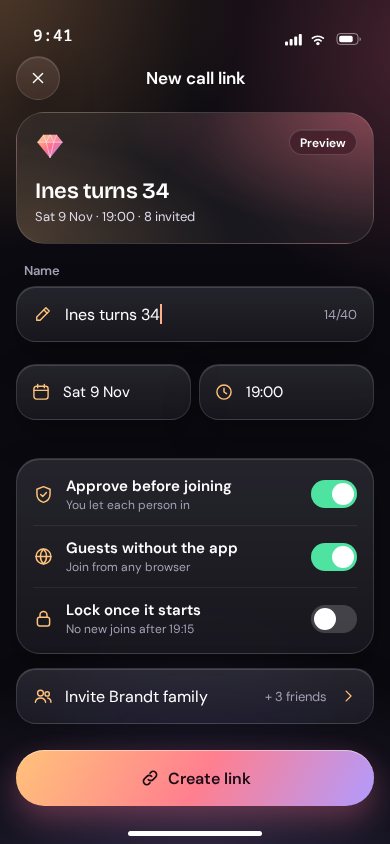
A form screen from Facet, a social app template in a Glass style. Screen 16 of 25.
Facet is a complete video calling app for the people you love: welcome, phone sign in and a code, a calls home with favourites and an upcoming family call, new call, a contact with local time and shared history, ringing, an incoming call, a one to one call with live captions, a group call that spotlights the speaker, effects and backgrounds, share screen, watch together, circles, call links, video messages with recording and playback, a call summary, weekly call time, a Plus plan, your profile and settings. Plum black glass with an apricot to lilac prism.
| Detail | Value |
|---|---|
| Screen type | Form |
| App | Facet: Video calls with family and friends |
| Category | Social |
| Design language | Glass, dark |
| Type | Bricolage Grotesque for headings, DM Sans for text |
| Colours | #0b0a10 background, #1a1622 surface, #ffffff text, #a59fb4 text-muted, #ff7f8f accent, #1c0c16 accent-contrast, #ffc27a secondary, #2a2433 border, #4fe3a1 success, #ff3b4f danger |
What this screen says
- New call link
- Ines turns 34
- Sat 9 Nov · 19:00 · 8 invited Preview
- Name
- Ines turns 34 14/40
- Sat 9 Nov
- Approve before joiningYou let each person in
- Guests without the appJoin from any browser
- Lock once it startsNo new joins after 19:15
- Invite Brandt family + 3 friends
- Create link
Around it in Facet
More form and input screens
- Spark About you: Swipe dating
- Candid Review: One real photo a day
- Blink Send to: Camera chat and stories
- Cipher Disappearing messages: Encrypted private messenger
- Commons New post: Friends, groups and events
- Tether Join circle: Family location and safety
- Stoop New post: Neighbourhood noticeboard
- Aura Drop a mood: Moods with close friends
- Kindly Log hours: Volunteering near you
- Cohort Request intro: Alumni and mentor network
- Kin New moment: Private family circle
- Confetti RSVP: Party invites and RSVPs
What makes a good form screen
- Ask only what you need. Every field is a reason to stop. Remove optional fields or move them to later.
- Labels above fields. Visible labels stay readable while people type; placeholder-only labels disappear.
- Use the right keyboard and input. Number pads for amounts, email keyboards for email, pickers for dates and autofill for addresses and codes.
- Validate as people go. Show problems next to the field when people leave it, in words that say how to fix them.
The full form screen guide and every example
Remix Facet free: describe your own app and it is drawn in this design. Or get its files from $10: Figma, React Native, SwiftUI, Flutter and HTML.