Templates · Form and input screens · Productivity app · Pageview
Pageview Compare screen
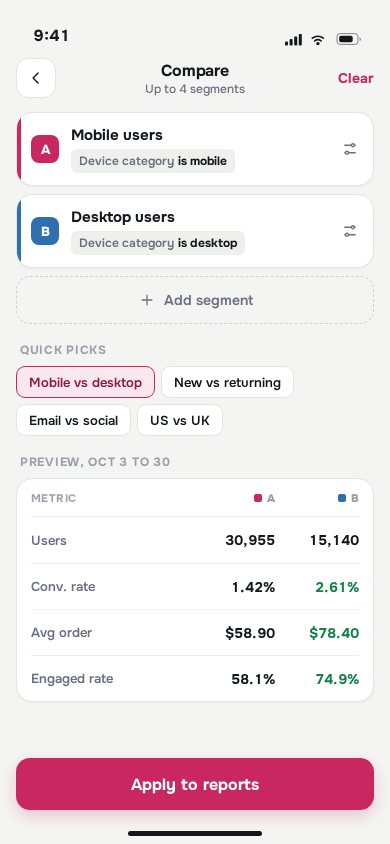
A form screen from Pageview, a website analytics app template in an Enterprise style. Screen 16 of 25.
Pageview is a complete website analytics app for an online plant shop: welcome, sign in and connecting the site with a tracking snippet, a home overview with metric cards and a period comparison chart, realtime visitors with minute bars and a live event stream, a report library, acquisition by channel and a channel's sources, pages and a page in depth, events and key events, audience by country and device, weekly retention cohorts, a checkout funnel, segment comparison, a custom date range, search, alerts with a new alert form and its confirmation, notifications, a Pro plan, account and settings. Pale stone and white with berry, ocean, saffron and sage series colours.
| Detail | Value |
|---|---|
| Screen type | Form |
| App | Pageview: Website analytics |
| Category | Productivity |
| Design language | Enterprise, light |
| Type | JetBrains Mono for headings, Onest for text |
| Colours | #f4f5f2 background, #ffffff surface, #13161c text, #6a7080 text-muted, #c8285f accent, #fbe7ee accent-tint, #16181f secondary, #e3e5df border, #2f6fb0 chart-2, #e09a2b chart-3, #4f9a74 chart-4, #11804a success, #c2410c danger |
What this screen says
- CompareUp to 4 segments
- Clear
- Mobile usersDevice category is mobile
- Desktop usersDevice category is desktop
- Add segment
- Quick picks
- Mobile vs desktop New vs returning Email vs social US vs UK
- Preview, Oct 3 to 30
- Metric AB
- Users 30,95515,140
- Conv. rate 1.42%2.61%
- Avg order $58.90$78.40
- Engaged rate 58.1%74.9%
- Apply to reports
Around it in Pageview
More form and input screens
- Kanso New task: Tasks, calendar and chat
- Margin Edit note: AI note taking
- Aide Command: Executive AI assistant
- Juno New chat: AI chat assistant
- Opal New task: Studio dashboard
- Jot Format: Quick notes and checklists
- Chrono Planner: World clock, timers and stopwatch
- Frontdesk Reply: Customer support inbox
- Campaign New campaign: Email marketing campaigns
- Outpost Compose: Schedule social posts
- Polish Rewrite: Writing assistant and keyboard
- Tapline Add link: Link-in-bio pages and analytics
Every productivity app form screen
What makes a good form screen
- Ask only what you need. Every field is a reason to stop. Remove optional fields or move them to later.
- Labels above fields. Visible labels stay readable while people type; placeholder-only labels disappear.
- Use the right keyboard and input. Number pads for amounts, email keyboards for email, pickers for dates and autofill for addresses and codes.
- Validate as people go. Show problems next to the field when people leave it, in words that say how to fix them.
The full form screen guide and every example
Remix Pageview free: describe your own app and it is drawn in this design. Or get its files from $10: Figma, React Native, SwiftUI, Flutter and HTML.