Templates · Detail screens · Smart home app · Latch
Latch Entry screen
A detail screen from Latch, a smart locks and guest access app template in a Minimal style. Screen 9 of 25.
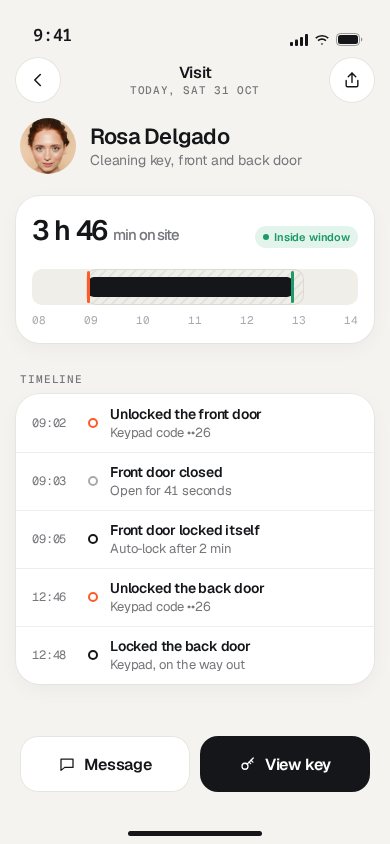
Latch is a complete smart lock app: welcome, sign in, a home with a big lock dial, door details, a live auto-lock countdown, every door across two homes, a door activity log with entry details, guest keys with schedules, an access window picker, review and a sent key, keypad codes with a number pad, auto-lock and auto-unlock, lock health insights, adding and calibrating a lock, a plan, notifications, account and settings. Porcelain and white with ink, one vermilion for unlocked and a calm green for locked.
| Detail | Value |
|---|---|
| Screen type | Detail |
| App | Latch: Smart locks and guest access |
| Category | Smart home |
| Design language | Minimal, light |
| Type | Geist Mono for headings, Geist for text |
| Colours | #f4f3ef background, #ffffff surface, #141619 text, #76777b text-muted, #ff5a28 accent, #ffebe3 accent-soft, #1d9a66 success, #d98a00 warning, #e7e5df border |
What this screen says
- VisitToday, Sat 31 Oct
- Rosa Delgado
- Cleaning key, front and back door
- 3 h 46 min on site
- Inside window
- Timeline
- Unlocked the front door
- Keypad code ••26
- Front door closed
- Open for 41 seconds
- Front door locked itself
- Auto-lock after 2 min
- Unlocked the back door
- Locked the back door
- Keypad, on the way out
- Message
- View key
Around it in Latch
More detail screens
- Tagged Living room: Home inventory for insurance
- Lobby Door key: Apartment building app
- Sweep Room: Robot vacuum and mop
- Dusk Scenario: Smart home scenarios
- Lumen Living room: Smart home energy
- Abode Room: Smart home devices
- Boxed Room: Book movers and plan moving day
- Meter Tariff: Your energy supplier account
- Couch Title: TV remote, casting and watchlist
- Chime Answer: Voice assistant and smart speaker
- Mesh Node: Home Wi-Fi network
- Decibel Room: Multi-room speakers
Every smart home app detail screen
What makes a good detail screen
- Lead with what identifies the item. A large image or title, the price or status, and the key facts at the top. People should know they are in the right place at a glance.
- Keep the main action visible. A sticky bottom button for Add to cart, Book or Play stays reachable while people scroll through details.
- Order information by importance. The facts that decide the choice come first; reviews, specifications and fine print further down.
- Use progressive disclosure. Long descriptions, specifications and policies can expand on tap rather than filling the screen.
The full detail screen guide and every example
Remix Latch free: describe your own app and it is drawn in this design. Or get its files from $10: Figma, React Native, SwiftUI, Flutter and HTML.