Templates · Onboarding screens · Fitness app · Labwork
Labwork Goals screen
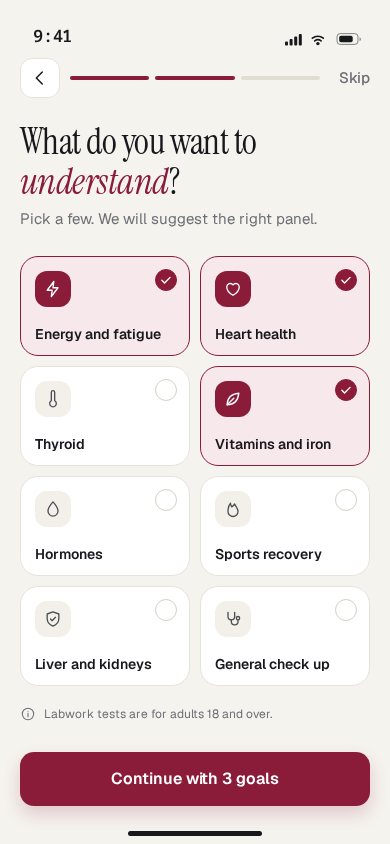
An onboarding screen from Labwork, a health and fitness app template in a Clinical style. Screen 2 of 25.
Labwork is a complete blood testing app for adults: welcome and health goals, sign in, a home with the next test and your latest score, a panel catalogue, a panel page, lab visit or home kit, a lab map, a time slot, checkout and a booking confirmed, fasting prep with a countdown, kit tracking, a finger prick guide, results, a full report, a biomarker against its reference range, trends over time, a doctor's note, a shareable PDF, retest plans, orders, notifications, profile and settings. Warm paper and white with deep garnet and a green, amber and coral range system.
| Detail | Value |
|---|---|
| Screen type | Onboarding |
| App | Labwork: Book blood tests and see results |
| Category | Health and fitness |
| Design language | Clinical, light |
| Type | Instrument Serif for headings, Geist for text |
| Colours | #f5f3ee background, #ffffff surface, #17181c text, #6d6f76 text-muted, #8a1c3a accent, #ffffff accent-contrast, #1f8a63 secondary, #e7e3da border, #e0553a danger |
What this screen says
- Skip
- What do you want to understand?
- Pick a few. We will suggest the right panel.
- Energy and fatigue
- Heart health
- Thyroid
- Vitamins and iron
- Hormones
- Sports recovery
- Liver and kidneys
- General check up
- Labwork tests are for adults 18 and over.
- Continue with 3 goals
Around it in Labwork
More onboarding screens
- Harbor Welcome: Therapy and mood
- Fasten Welcome: Intermittent fasting
- Plate Welcome: Calorie and macro tracker
- Vita Welcome: Personal health record
- Forge Welcome: AI fitness and nutrition
- Lull Welcome: Sleep sounds and meditation
- Pace Welcome: Fitness tracker
- Flexpass Welcome: One membership, many studios
- Clinic Welcome: Find and book doctors
- Careline Welcome: Care for an ageing parent
- Velo Welcome: Live and on-demand indoor cycling
- Vantage Welcome: Sports watch companion
Every fitness app onboarding screen
What makes a good onboarding screen
- One idea per screen. Each screen should say one thing in a headline people can read in a second. If a screen needs a paragraph, it is doing too much.
- Personalise with a purpose. Ask a question only if the answer changes what people see next, like a goal, a level or an interest. Then show that the answer mattered.
- Explain permissions before asking. Show your own screen saying why you need notifications, location or the camera before the system prompt. People who understand the reason are more likely to allow it.
- Let people skip. A visible skip or "I'll do this later" respects returning users and the impatient. Make sure skipping still lands them somewhere useful.
The full onboarding screen guide and every example
Remix Labwork free: describe your own app and it is drawn in this design. Or get its files from $10: Figma, React Native, SwiftUI, Flutter and HTML.