Templates · Onboarding screens · Fitness app · Vantage
Vantage Welcome screen
An onboarding screen from Vantage, a sports watch companion app template in a Clinical style. Screen 1 of 25.
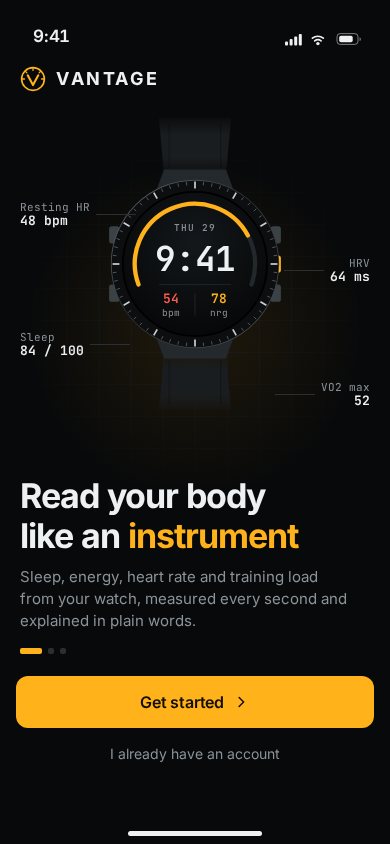
Vantage is a complete sports watch companion: welcome, sign in and watch pairing, a customisable my day of cards, sleep score with stages, an energy reserve curve, heart rate, HRV status, training readiness and training load, activity history with a run on a map, splits and heart rate zones, suggested workouts with a structured interval plan scheduled and synced to the watch, device status, watch faces with complications, badges and challenges, notifications, a Pro plan, profile and settings. True black and charcoal with signal amber, cyan, mint and coral.
| Detail | Value |
|---|---|
| Screen type | Onboarding |
| App | Vantage: Sports watch companion |
| Category | Health and fitness |
| Design language | Clinical, dark |
| Type | JetBrains Mono for headings, Inter for text |
| Colours | #08090a background, #111315 surface, #eef1f2 text, #8a9399 text-muted, #ffb21a accent, #140d00 accent-contrast, #3cc8e8 secondary, #1f2327 border, #ff5c4d danger |
What this screen says
- VANTAGE
- Resting HR
- 48 bpm
- HRV
- 64 ms
- Sleep
- VO2 max
- Read your body
- like an instrument
- Sleep, energy, heart rate and training load from your watch, measured every second and explained in plain words.
- Get started
- I already have an account
Around it in Vantage
More onboarding screens
- Reformer Welcome: Pilates studio booking
- Sip Welcome: Water intake and hydration
- Mend Welcome: Physio and rehab exercises
- Tabata Welcome: HIIT interval timer
- Jab Welcome: Boxing workouts with a smart bag
- Exhale Welcome: Breathwork sessions
- Bump Welcome: Pregnancy week by week
- Locker Welcome: Gym membership and class booking
- Morsel Welcome: AI calorie tracker
- Dew Welcome: AI skin scan and routine
- Cradle Welcome: Baby tracker
- Medly Welcome: Doctor on call
Every fitness app onboarding screen
What makes a good onboarding screen
- One idea per screen. Each screen should say one thing in a headline people can read in a second. If a screen needs a paragraph, it is doing too much.
- Personalise with a purpose. Ask a question only if the answer changes what people see next, like a goal, a level or an interest. Then show that the answer mattered.
- Explain permissions before asking. Show your own screen saying why you need notifications, location or the camera before the system prompt. People who understand the reason are more likely to allow it.
- Let people skip. A visible skip or "I'll do this later" respects returning users and the impatient. Make sure skipping still lands them somewhere useful.
The full onboarding screen guide and every example
Remix Vantage free: describe your own app and it is drawn in this design. Or get its files from $10: Figma, React Native, SwiftUI, Flutter and HTML.