Templates · Search and explore screens · Fitness app · Kilo
Kilo Exercises screen
A search screen from Kilo, a strength training log app template in a Brutalist style. Screen 10 of 25.
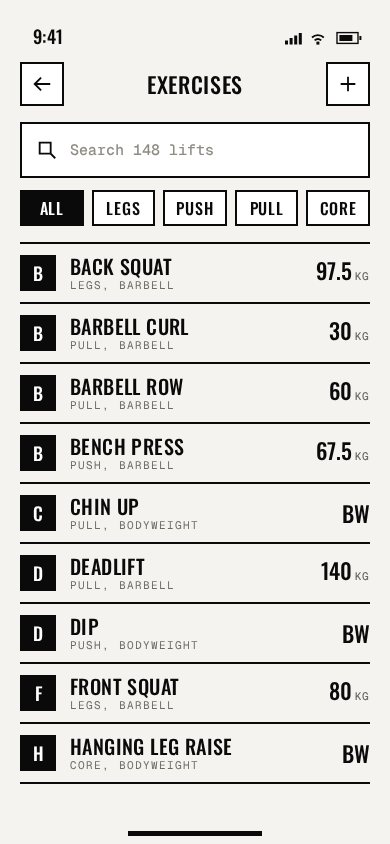
Kilo is a complete lifting log: welcome, sign in, a short setup, today's workout, a live session with a set table and a rest timer, a plate calculator that draws the loaded bar, an exercise library, lift history, a finished session and a new record. Around it sit history, records, programs, weekly volume and body stats, a weigh in, a Pro plan, notifications, profile and settings. Everything is kilograms, reps and big numbers.
| Detail | Value |
|---|---|
| Screen type | Search |
| App | Kilo: Strength training log |
| Category | Health and fitness |
| Design language | Brutalist, light |
| Type | Oswald |
| Colours | #f4f3ef background, #ffffff surface, #0a0a0a text, #6e6c66 text-muted, #f0231b accent, #ffffff accent-contrast, #0a0a0a secondary, #0a0a0a border, #f0231b danger |
What this screen says
- Exercises
- Search 148 lifts
- All
- Legs
- Push
- Pull
- Core
- Back squat
- Legs, barbell
- 97.5kg
- Barbell curl
- Pull, barbell
- 30kg
- Barbell row
- 60kg
- Bench press
- Push, barbell
- 67.5kg
- Chin up
- Pull, bodyweight
- BW
- Deadlift
- 140kg
- Dip
- Push, bodyweight
- Front squat
- 80kg
- Hanging leg raise
- Core, bodyweight
Around it in Kilo
More search and explore screens
- Rise Sleep aids: Alarm clock and sleep cycles
- Ward Find care: Patient portal for results, visits and messages
- Level Foods: Glucose monitor companion
- Reformer Search: Pilates studio booking
- Sip Drinks: Water intake and hydration
- Mend Library: Physio and rehab exercises
- Tabata Workouts: HIIT interval timer
- Jab Workouts: Boxing workouts with a smart bag
- Exhale Explore: Breathwork sessions
- Bump Classes: Pregnancy week by week
- Locker Search: Gym membership and class booking
- Morsel Food search: AI calorie tracker
Every fitness app search screen
What makes a good search screen
- Show something before people type. Recent searches, popular items or categories make the empty search screen useful and save typing.
- Suggest as people type. Autocomplete with matching items, not only matching words, lets people jump straight to a result.
- Make filters visible and reversible. Show active filters as chips that can be removed in one tap, and the number of results as filters change.
- Forgive typos. Close matches and "Did you mean" stop a spelling mistake from ending in an empty screen.
The full search screen guide and every example
Remix Kilo free: describe your own app and it is drawn in this design. Or get its files from $10: Figma, React Native, SwiftUI, Flutter and HTML.