Templates · Detail screens · Productivity app · Inkwell
Inkwell Tag screen
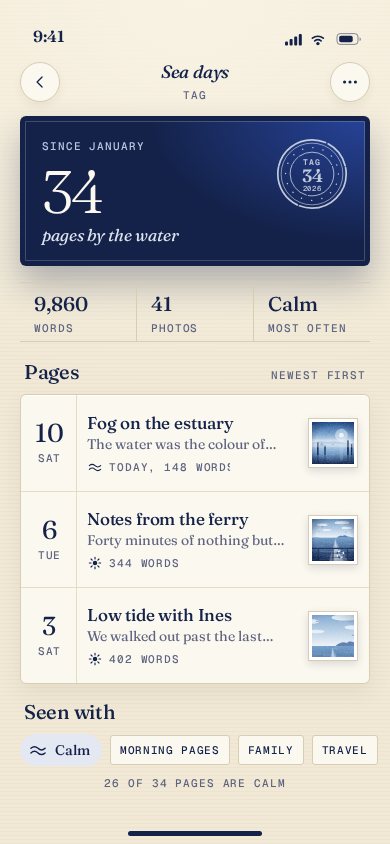
A detail screen from Inkwell, a daily journal app template in a Luxury style. Screen 17 of 25.
Inkwell is a complete daily journal: welcome, sign in, a passcode lock and a daily reminder, today's page with a prompt, a ruled editor with photos, a mood drawn in ink, the saved entry, the whole journal as a timeline, a calendar of entries, search, tags, on this day, mood trends, a year in review, a printed volume to order, a Folio plan, notifications, profile and settings. Every date is a postmark and every page is paper.
| Detail | Value |
|---|---|
| Screen type | Detail |
| App | Inkwell: Daily journal |
| Category | Productivity |
| Design language | Luxury, light |
| Type | Fraunces |
| Colours | #f1e9d6 background, #fbf8ef surface, #14224a text, #5e6480 text-muted, #1f3d94 accent, #fbf8ef accent-contrast, #d9e0ee secondary, #d8cdb2 border, #a8392b danger |
What this screen says
- Sea days
- Tag
- Since January
- pages by the water
- 9,860words
- 41photos
- Calmmost often
- Pages
- Newest first
- Fog on the estuary
- The water was the colour of…
- Notes from the ferry
- Forty minutes of nothing but…
- Low tide with Ines
- We walked out past the last…
- Seen with
- Calm Morning pages Family Travel
- 26 of 34 pages are calm
Around it in Inkwell
More detail screens
- Frontdesk Ticket: Customer support inbox
- Campaign: Email marketing campaigns
- Outpost Previews: Schedule social posts
- Pageview Channel: Website analytics
- Polish Suggestion: Writing assistant and keyboard
- Tapline Link: Link-in-bio pages and analytics
- Quill Doc: Docs, wikis and databases in one workspace
- Tandem Channel: Team chat, channels and huddles
- Shipyard Issue: Issue tracking for product teams
- Canvas File: Design files and comments on mobile
- Merge Repository: Code, pull requests and reviews
- Query Answer: AI answers with sources
Every productivity app detail screen
What makes a good detail screen
- Lead with what identifies the item. A large image or title, the price or status, and the key facts at the top. People should know they are in the right place at a glance.
- Keep the main action visible. A sticky bottom button for Add to cart, Book or Play stays reachable while people scroll through details.
- Order information by importance. The facts that decide the choice come first; reviews, specifications and fine print further down.
- Use progressive disclosure. Long descriptions, specifications and policies can expand on tap rather than filling the screen.
The full detail screen guide and every example
Remix Inkwell free: describe your own app and it is drawn in this design. Or get its files from $10: Figma, React Native, SwiftUI, Flutter and HTML.