Templates · List and feed screens · Productivity app · Inkwell
Inkwell On this day screen
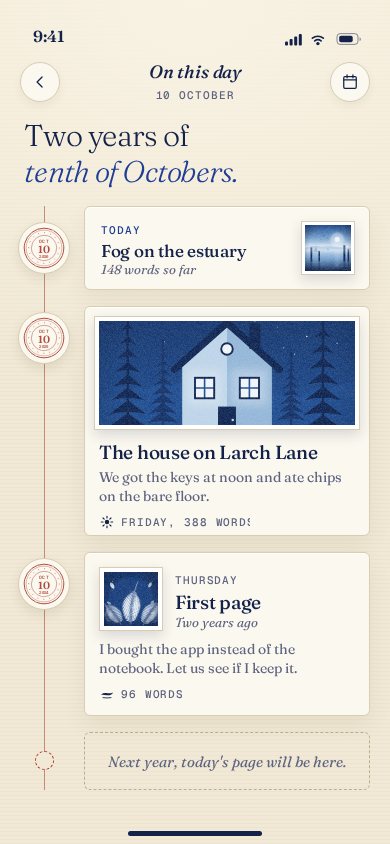
A list screen from Inkwell, a daily journal app template in a Luxury style. Screen 18 of 25.
Inkwell is a complete daily journal: welcome, sign in, a passcode lock and a daily reminder, today's page with a prompt, a ruled editor with photos, a mood drawn in ink, the saved entry, the whole journal as a timeline, a calendar of entries, search, tags, on this day, mood trends, a year in review, a printed volume to order, a Folio plan, notifications, profile and settings. Every date is a postmark and every page is paper.
| Detail | Value |
|---|---|
| Screen type | List |
| App | Inkwell: Daily journal |
| Category | Productivity |
| Design language | Luxury, light |
| Type | Fraunces |
| Colours | #f1e9d6 background, #fbf8ef surface, #14224a text, #5e6480 text-muted, #1f3d94 accent, #fbf8ef accent-contrast, #d9e0ee secondary, #d8cdb2 border, #a8392b danger |
What this screen says
- On this day
- 10 October
- Two years of
- tenth of Octobers.
- Today
- Fog on the estuary
- 148 words so far
- The house on Larch Lane
- We got the keys at noon and ate chips on the bare floor.
- Thursday
- First page
- Two years ago
- I bought the app instead of the notebook. Let us see if I keep it.
- Next year, today's page will be here.
Around it in Inkwell
More list and feed screens
- Slot Calendar: Booking links and meeting scheduling
- Sheet Base: Spreadsheets and databases
- Tunnel Specialty servers: VPN and online privacy
- Ping History: Internet speed test
- Glance History: Visual search with the camera
- Replay Library: Record and share screen videos
- Easel Templates: Collaborative whiteboard
- Token Requests: Two-factor codes and sign-in approvals
- Beam Transfers: Send big files
- Parchment Files: Documents, edit and share
- Lectern New deck: Slides and presenter remote
- Ringer Recents: Phone, contacts and voicemail
Every productivity app list screen
What makes a good list screen
- Show what people need to decide. Each row should carry just enough to choose: a title, one or two details and a status. Everything else belongs on the detail screen.
- Keep rows consistent. The same information in the same place on every row lets people scan down a column instead of reading each item.
- Group with headings. Dates, categories or status headings break long lists into chunks people can skip through.
- Make common actions quick. Swipe actions, a checkbox or a heart on the row save opening the item for small tasks.
The full list screen guide and every example
Remix Inkwell free: describe your own app and it is drawn in this design. Or get its files from $10: Figma, React Native, SwiftUI, Flutter and HTML.