Templates · Player, camera and editor screens · Productivity app · Inkline
Inkline Place fields screen
A media screen from Inkline, a sign and send contracts app template in a Clinical style. Screen 13 of 25.
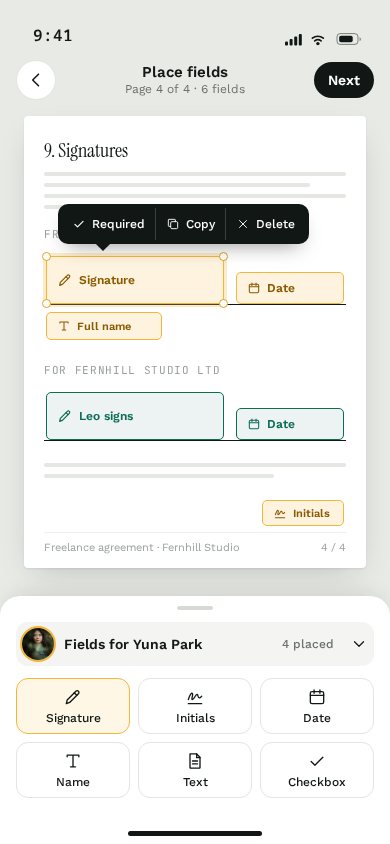
Inkline is a complete contract signing app: welcome, sign in, adopting a signature, a home with what needs your signature, an inbox of envelopes, an envelope with its signer chain, a document viewer with sign here flags, a signature pad, finish and signed, then sending your own: upload, recipients and signing order, placing fields on the page, review and sent, live status as a signer reads, the audit trail certificate, templates, search, contacts, turnaround insights, plans, notifications, profile and settings. Paper white and hairlines with deep viridian ink and amber flags.
| Detail | Value |
|---|---|
| Screen type | Media |
| App | Inkline: Sign and send contracts |
| Category | Productivity |
| Design language | Clinical, light |
| Type | Instrument Serif for headings, Work Sans for text |
| Colours | #f4f5f2 background, #ffffff surface, #111714 text, #69726d text-muted, #0d6b57 accent, #e3f0eb accent-soft, #f5b638 secondary, #e2e5e0 border, #b23a2e danger |
What this screen says
- Place fields
- Page 4 of 4 · 6 fields
- Next
- 9. Signatures
- FREELANCER
- FOR FERNHILL STUDIO LTD
- Freelance agreement · Fernhill Studio 4 / 4
- Signature
- Date
- Full name
- Leo signs
- Initials
- Required Copy Delete
- Fields for Yuna Park 4 placed
- Name
- Text
- Checkbox
Around it in Inkline
More player, camera and editor screens
- Scanly Scan: Document scanner
- Inkwell Add photos: Daily journal
- Shortlist Practice question: Job search and application tracker
- Parley Status: Team messenger
- Docket Call: Task and sprint planner
- Margin Voice note: AI note taking
- Aide Ask Aide: Executive AI assistant
- Juno Voice: AI chat assistant
- Jot Sketch: Quick notes and checklists
- Chrono Focus: World clock, timers and stopwatch
- Frontdesk Call: Customer support inbox
- Campaign Email builder: Email marketing campaigns
Every productivity app media screen
What makes a good media player screen
- Content takes the space. Artwork, video or the camera view should fill most of the screen.
- Primary controls in the thumb zone. Play and pause, the shutter or the main tool, large and low on the screen.
- Show progress and position. A scrubber with elapsed and remaining time, or the step in a lesson.
- Hide secondary controls until needed. Lyrics, queue, filters and advanced tools can live behind a tap or a swipe.
The full media player screen guide and every example
Remix Inkline free: describe your own app and it is drawn in this design. Or get its files from $10: Figma, React Native, SwiftUI, Flutter and HTML.