Templates · Detail screens · Music app · Hum
Hum Concert screen
A detail screen from Hum, a song recognition app template in a Glass style. Screen 18 of 25.
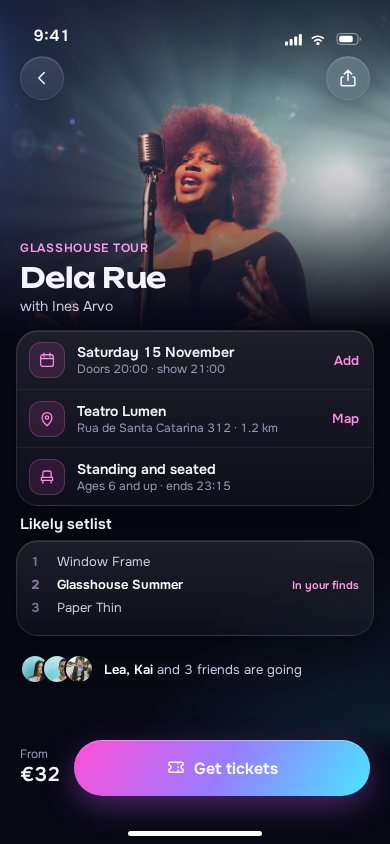
Hum is a complete song recognition app: welcome, microphone access, sign in, a home with the listening orb and recent finds, listening and hum mode, the match with synced lyrics and a preview player, artist and album pages, your library of finds, search, city charts, songs found nearby on a map, your listening stats, concerts with tickets and a booking confirmation, a share card, Hum Plus, notifications, profile and settings. Ink navy glass lit by magenta and aqua.
| Detail | Value |
|---|---|
| Screen type | Detail |
| App | Hum: Song recognition |
| Category | Music |
| Design language | Glass, dark |
| Type | Unbounded for headings, Onest for text |
| Colours | #070814 background, #15152a surface, #f4f3ff text, #9a98b8 text-muted, #ff4fd8 accent, #ffffff accent-contrast, #48e5ff secondary, #26253f border, #ff5a7a danger |
What this screen says
- Glasshouse tour
- Dela Rue
- with Ines Arvo
- Saturday 15 November
- Doors 20:00 · show 21:00
- Add
- Teatro Lumen
- Rua de Santa Catarina 312 · 1.2 km
- Map
- Standing and seated
- Ages 6 and up · ends 23:15
- Likely setlist
- 1Window Frame
- 2Glasshouse SummerIn your finds
- 3Paper Thin
- Lea, Kai and 3 friends are going
- From €32
- Get tickets
Around it in Hum
More detail screens
- Masters Release: Royalties and streams for artists
- Sonata Concert: Concert hall season and tickets
- Quire Composer: Sheet music and practice
- Wax Album: Music streaming
- Earshot Show: Podcast player
- Strum Lesson: Learn guitar, one chord at a time
- Gigly Gig: Gig and festival tickets
- Padd Edit pad: Beat maker
- Aria Book: Audiobook library
- Riff Track: Upload and discover new tracks
- Groove Record: Vinyl collection and crate digging
- Crossfade Track: DJ mixing on the go
What makes a good detail screen
- Lead with what identifies the item. A large image or title, the price or status, and the key facts at the top. People should know they are in the right place at a glance.
- Keep the main action visible. A sticky bottom button for Add to cart, Book or Play stays reachable while people scroll through details.
- Order information by importance. The facts that decide the choice come first; reviews, specifications and fine print further down.
- Use progressive disclosure. Long descriptions, specifications and policies can expand on tap rather than filling the screen.
The full detail screen guide and every example
Remix Hum free: describe your own app and it is drawn in this design. Or get its files from $10: Figma, React Native, SwiftUI, Flutter and HTML.