Templates · Booking and checkout screens · Music app · Hum
Hum Tickets screen
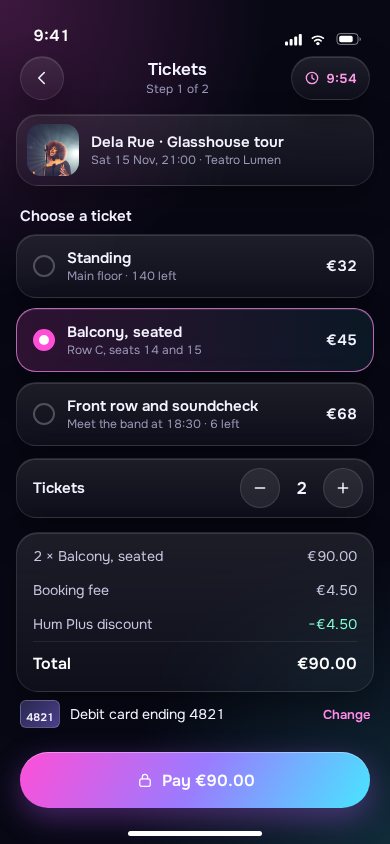
A checkout screen from Hum, a song recognition app template in a Glass style. Screen 19 of 25.
Hum is a complete song recognition app: welcome, microphone access, sign in, a home with the listening orb and recent finds, listening and hum mode, the match with synced lyrics and a preview player, artist and album pages, your library of finds, search, city charts, songs found nearby on a map, your listening stats, concerts with tickets and a booking confirmation, a share card, Hum Plus, notifications, profile and settings. Ink navy glass lit by magenta and aqua.
| Detail | Value |
|---|---|
| Screen type | Checkout |
| App | Hum: Song recognition |
| Category | Music |
| Design language | Glass, dark |
| Type | Unbounded for headings, Onest for text |
| Colours | #070814 background, #15152a surface, #f4f3ff text, #9a98b8 text-muted, #ff4fd8 accent, #ffffff accent-contrast, #48e5ff secondary, #26253f border, #ff5a7a danger |
What this screen says
- TicketsStep 1 of 2
- Dela Rue · Glasshouse tour
- Sat 15 Nov, 21:00 · Teatro Lumen
- Choose a ticket
- Standing
- Main floor · 140 left
- Balcony, seated
- Row C, seats 14 and 15
- Front row and soundcheck
- Meet the band at 18:30 · 6 left
- Tickets
- 2 × Balcony, seated €90.00
- Booking fee €4.50
- Hum Plus discount −€4.50
- Total €90.00
- Debit card ending 4821
- Change
- Pay €90.00
Around it in Hum
More booking and checkout screens
- Aria Use a credit: Audiobook library
- Riff Checkout: Upload and discover new tracks
- Groove Basket: Vinyl collection and crate digging
- Crossfade Cart: DJ mixing on the go
- Fork Checkout: Tuner and metronome
- Belt Book a room: Karaoke nights
- Crowd Tickets: Concert diary and setlists
- Dial Support: Internet radio from everywhere
- Chorus Checkout: Singing lessons and pitch training
- Verse Split sheet: Songwriting notebook
- Masters Review payout: Royalties and streams for artists
- Sonata Choose seats: Concert hall season and tickets
Every music app checkout screen
What makes a good checkout screen
- Show the total early and honestly. Taxes, delivery and service fees should appear before the last step. A higher total on the final screen feels like a trick.
- Offer wallet payments. Apple Pay and Google Pay skip card typing entirely. Show them first when they are available.
- Ask for the minimum. Only the fields needed to deliver or book. Save details for next time.
- Let people review before paying. A clear summary of items, dates, address and price, with each part editable without starting over.
The full checkout screen guide and every example
Remix Hum free: describe your own app and it is drawn in this design. Or get its files from $10: Figma, React Native, SwiftUI, Flutter and HTML.