Templates · Booking and checkout screens · Lifestyle app · Handy
Handy Order details screen
A checkout screen from Handy, a home services app template in a Minimal style. Screen 11 of 25.
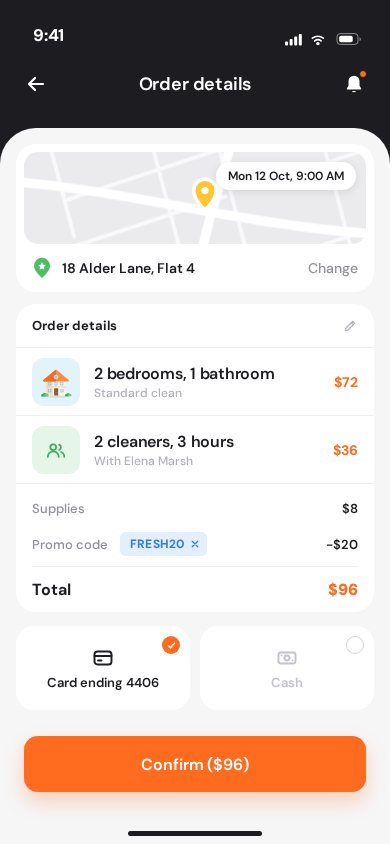
Handy is a complete home services app: onboarding, sign in, a home with service tiles and offers, every service, a cleaning set-up with home size and extras, choosing a professional, a calendar with time slots, the address on a map, order details with a promo code, card payment, a booking placed screen, live tracking of the pro, chat, a rating, bookings, spending, a membership, notifications, profile, settings and help. Charcoal, white and orange with soft pastel tiles.
| Detail | Value |
|---|---|
| Screen type | Checkout |
| App | Handy: Home services |
| Category | Lifestyle |
| Design language | Minimal, light |
| Type | DM Sans |
| Colours | #f6f6f7 background, #ffffff surface, #1c1c21 text, #8f9099 text-muted, #ff6b1f accent, #ffffff accent-contrast, #4cbf63 secondary, #ececef border, #f0432c danger |
What this screen says
- Order details
- Mon 12 Oct, 9:00 AM
- 18 Alder Lane, Flat 4Change
- 2 bedrooms, 1 bathroom
- Standard clean
- 2 cleaners, 3 hours
- With Elena Marsh
- Supplies $8
- Promo code FRESH20 -$20
- Total$96
- Card ending 4406
- Cash
- Confirm ($96)
Around it in Handy
More booking and checkout screens
- Kiln Basket: Handmade marketplace
- Kino Payment: Film and series streaming
- Waybill Send a parcel: Every parcel, read like its label
- Torque Log a service: The workshop manual for your own car
- Vetly Book a visit: Pet health record
- Trellis Log harvest: Vegetable garden planner
- Posy Delivery: Flower delivery and weekly stems
- Fern Cart: Plant care
- Doorstep Book a viewing: Homes for sale and rent
- Rewear Bag: Secondhand fashion marketplace
- Laced Checkout: Sneaker drops and raffles
- Gloss Pick a time: Salon and spa booking
Every lifestyle app checkout screen
What makes a good checkout screen
- Show the total early and honestly. Taxes, delivery and service fees should appear before the last step. A higher total on the final screen feels like a trick.
- Offer wallet payments. Apple Pay and Google Pay skip card typing entirely. Show them first when they are available.
- Ask for the minimum. Only the fields needed to deliver or book. Save details for next time.
- Let people review before paying. A clear summary of items, dates, address and price, with each part editable without starting over.
The full checkout screen guide and every example
Remix Handy free: describe your own app and it is drawn in this design. Or get its files from $10: Figma, React Native, SwiftUI, Flutter and HTML.