Templates · Form and input screens · Lifestyle app · Handy
Handy Address screen
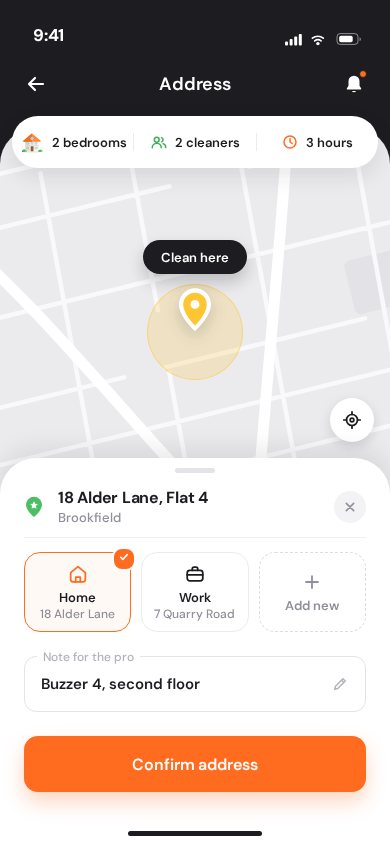
A form screen from Handy, a home services app template in a Minimal style. Screen 10 of 25.
Handy is a complete home services app: onboarding, sign in, a home with service tiles and offers, every service, a cleaning set-up with home size and extras, choosing a professional, a calendar with time slots, the address on a map, order details with a promo code, card payment, a booking placed screen, live tracking of the pro, chat, a rating, bookings, spending, a membership, notifications, profile, settings and help. Charcoal, white and orange with soft pastel tiles.
| Detail | Value |
|---|---|
| Screen type | Form |
| App | Handy: Home services |
| Category | Lifestyle |
| Design language | Minimal, light |
| Type | DM Sans |
| Colours | #f6f6f7 background, #ffffff surface, #1c1c21 text, #8f9099 text-muted, #ff6b1f accent, #ffffff accent-contrast, #4cbf63 secondary, #ececef border, #f0432c danger |
What this screen says
- Address
- 2 bedrooms 2 cleaners 3 hours
- Clean here
- 18 Alder Lane, Flat 4
- Brookfield
- Home18 Alder Lane
- Work7 Quarry Road
- Add new
- Note for the pro
- Buzzer 4, second floor
- Confirm address
Around it in Handy
More form and input screens
- Stitch Add yarn: A knitting companion drawn as one big knitting chart
- Roost Add item: Your shared house, stuck to the fridge door
- Grain Export: Camera and photo editor
- Posy Build a bouquet: Flower delivery and weekly stems
- Fern Log watering: Plant care
- Doorstep Filters: Homes for sale and rent
- Rewear Make an offer: Secondhand fashion marketplace
- Laced Release alert: Sneaker drops and raffles
- Gloss Write a review: Salon and spa booking
- Vow Add expense: Wedding planner
- Drizzle Edit widget: Weather with living skies
- Shelf Log progress: Reading tracker and book club
Every lifestyle app form screen
What makes a good form screen
- Ask only what you need. Every field is a reason to stop. Remove optional fields or move them to later.
- Labels above fields. Visible labels stay readable while people type; placeholder-only labels disappear.
- Use the right keyboard and input. Number pads for amounts, email keyboards for email, pickers for dates and autofill for addresses and codes.
- Validate as people go. Show problems next to the field when people leave it, in words that say how to fix them.
The full form screen guide and every example
Remix Handy free: describe your own app and it is drawn in this design. Or get its files from $10: Figma, React Native, SwiftUI, Flutter and HTML.