Templates · Detail screens · Social app · Guild
Guild Thread screen
A detail screen from Guild, a social app template in a Dark-first style. Screen 7 of 25.
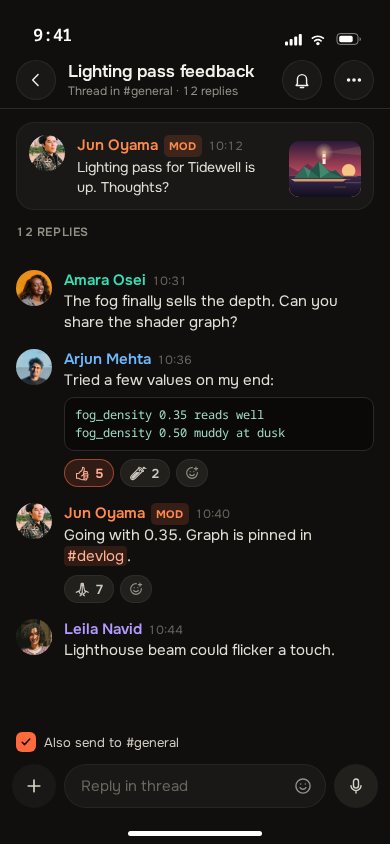
Guild is a complete community chat app: welcome, sign in, a code check and interests, a home with a server rail and channel list, a busy text channel with replies, reactions and a thread, a voice room with video and a shared screen, a live stage, direct messages, discover and a server preview, message search, members and a member card, create a server, an event, server insights, an inbox, a Plus plan with checkout and confirmation, profile and settings. Warm charcoal with ember orange and a teal for live voice.
| Detail | Value |
|---|---|
| Screen type | Detail |
| App | Guild: Community servers with voice and text chat |
| Category | Social |
| Design language | Dark-first, dark |
| Type | Bricolage Grotesque for headings, Onest for text |
| Colours | #100f0e background, #191816 surface, #f4f1ea text, #948f87 text-muted, #ff6a3d accent, #1b0700 accent-contrast, #35e0b5 secondary, #2c2a26 border, #ff4d5e danger |
What this screen says
- Lighting pass feedbackThread in #general · 12 replies
- Jun Oyama MOD10:12
- Lighting pass for Tidewell is up. Thoughts?
- 12 replies
- Amara Osei 10:31
- The fog finally sells the depth. Can you share the shader graph?
- Arjun Mehta 10:36
- Tried a few values on my end:
- fog_density 0.35 reads well
- fog_density 0.50 muddy at dusk
- 👍 5 🧪 2
- Jun Oyama MOD10:40
- Going with 0.35. Graph is pinned in #devlog.
- 🙏 7
- Leila Navid 10:44
- Lighthouse beam could flicker a touch.
- Also send to #general
- Reply in thread
Around it in Guild
More detail screens
- Commons Post: Friends, groups and events
- Tether Member: Family location and safety
- Facet Contact: Video calls with family and friends
- Stoop Lost cat: Neighbourhood noticeboard
- Aura Friend aura: Moods with close friends
- Kindly Opportunity: Volunteering near you
- Cohort Mentor: Alumni and mentor network
- Kin Moment: Private family circle
- Confetti Invite: Party invites and RSVPs
- Ripple Note: Voice notes social
- Duo Answers: An app for two
- Soapbox Motion: Weekly debates and polls
Every social app detail screen
What makes a good detail screen
- Lead with what identifies the item. A large image or title, the price or status, and the key facts at the top. People should know they are in the right place at a glance.
- Keep the main action visible. A sticky bottom button for Add to cart, Book or Play stays reachable while people scroll through details.
- Order information by importance. The facts that decide the choice come first; reviews, specifications and fine print further down.
- Use progressive disclosure. Long descriptions, specifications and policies can expand on tap rather than filling the screen.
The full detail screen guide and every example
Remix Guild free: describe your own app and it is drawn in this design. Or get its files from $10: Figma, React Native, SwiftUI, Flutter and HTML.