Templates · Booking and checkout screens · Lifestyle app · Guardrail
Guardrail Bonus time screen
A checkout screen from Guardrail, a parental controls and screen time app template in a Minimal style. Screen 16 of 25.
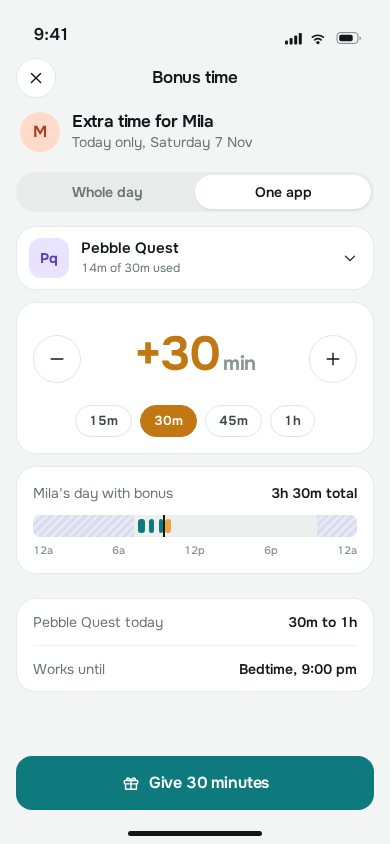
Guardrail is a complete family screen time app for parents: welcome, adding a child, sign in and linking a device, a family home with each child's day rail, a child overview, weekly activity, per app usage, daily and app limits, a bedtime dial, school time, app approval requests with an approved screen, bonus time, content filters by age, live location, devices with lock and ring, notifications, a Plus plan, profile and settings. Pale mist and white with petrol teal, dusk indigo and a warm amber for bonus time.
| Detail | Value |
|---|---|
| Screen type | Checkout |
| App | Guardrail: Parental controls and screen time |
| Category | Lifestyle |
| Design language | Minimal, light |
| Type | Onest |
| Colours | #f3f5f4 background, #ffffff surface, #12181b text, #687476 text-muted, #0e7a7e accent, #ffffff accent-contrast, #3d3f8f secondary, #e6eae9 border, #e5603f danger |
What this screen says
- Bonus time
- Extra time for Mila
- Today only, Saturday 7 Nov
- Whole day One app
- Pq
- Pebble Quest
- 14m of 30m used
- +30min
- 15m 30m 45m 1h
- Mila's day with bonus3h 30m total
- 12a 6a 12p 6p 12a
- Pebble Quest today30m to 1h
- Works untilBedtime, 9:00 pm
- Give 30 minutes
Around it in Guardrail
More booking and checkout screens
- Emporia Cart: Everything store
- Sable Bag: Fashion store
- Kiln Basket: Handmade marketplace
- Kino Payment: Film and series streaming
- Waybill Send a parcel: Every parcel, read like its label
- Torque Log a service: The workshop manual for your own car
- Vetly Book a visit: Pet health record
- Trellis Log harvest: Vegetable garden planner
- Posy Delivery: Flower delivery and weekly stems
- Fern Cart: Plant care
- Doorstep Book a viewing: Homes for sale and rent
- Rewear Bag: Secondhand fashion marketplace
Every lifestyle app checkout screen
What makes a good checkout screen
- Show the total early and honestly. Taxes, delivery and service fees should appear before the last step. A higher total on the final screen feels like a trick.
- Offer wallet payments. Apple Pay and Google Pay skip card typing entirely. Show them first when they are available.
- Ask for the minimum. Only the fields needed to deliver or book. Save details for next time.
- Let people review before paying. A clear summary of items, dates, address and price, with each part editable without starting over.
The full checkout screen guide and every example
Remix Guardrail free: describe your own app and it is drawn in this design. Or get its files from $10: Figma, React Native, SwiftUI, Flutter and HTML.