Templates · Dashboard and stats screens · Lifestyle app · Guardrail
Guardrail Activity screen
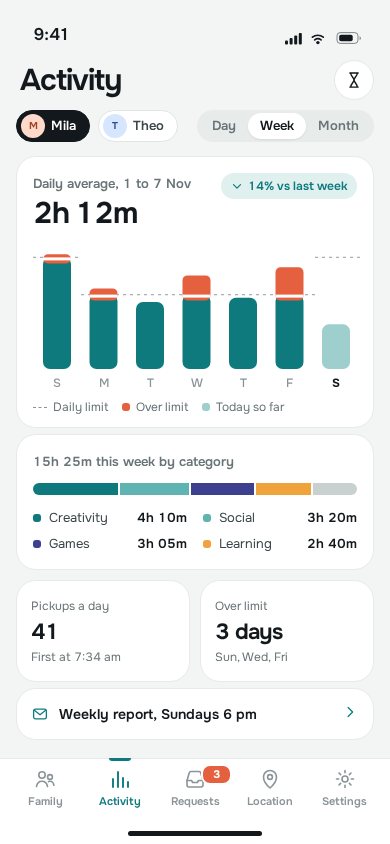
A dashboard screen from Guardrail, a parental controls and screen time app template in a Minimal style. Screen 7 of 25.
Guardrail is a complete family screen time app for parents: welcome, adding a child, sign in and linking a device, a family home with each child's day rail, a child overview, weekly activity, per app usage, daily and app limits, a bedtime dial, school time, app approval requests with an approved screen, bonus time, content filters by age, live location, devices with lock and ring, notifications, a Plus plan, profile and settings. Pale mist and white with petrol teal, dusk indigo and a warm amber for bonus time.
| Detail | Value |
|---|---|
| Screen type | Dashboard |
| App | Guardrail: Parental controls and screen time |
| Category | Lifestyle |
| Design language | Minimal, light |
| Type | Onest |
| Colours | #f3f5f4 background, #ffffff surface, #12181b text, #687476 text-muted, #0e7a7e accent, #ffffff accent-contrast, #3d3f8f secondary, #e6eae9 border, #e5603f danger |
What this screen says
- Activity
- M Mila T Theo
- Day Week Month
- Daily average, 1 to 7 Nov 2h 12m
- 14% vs last week
- Daily limit Over limit Today so far
- 15h 25m this week by category
- Creativity4h 10m
- Social3h 20m
- Games3h 05m
- Learning2h 40m
- Pickups a day41First at 7:34 am
- Over limit3 daysSun, Wed, Fri
- Weekly report, Sundays 6 pm
- Family
- Requests 3
- Location
- Settings
Around it in Guardrail
More dashboard and stats screens
- Provenance Earnings: Authenticated luxury resale
- Gavel My bids: Live online auctions
- Tidy Home stats: Book home cleaners
- Dorm Compare: Find student housing
- Hem Measurements: Tailoring and alterations, collected
- Lendly Credits: Borrow things from neighbours
- Stub Selling: Fan to fan ticket resale
- Trove Stats: Visual ideas and boards
- Vidi Studio: Video platform for creators
- Roll Storage: Photo library and backups
- Splice Cloud: Video editor for short clips
- Blush Club: Beauty and makeup shopping
Every lifestyle app dashboard screen
What makes a good dashboard screen
- One headline number. The figure that matters most, like balance, steps or revenue, large at the top with its change since the last period.
- Give numbers context. Compared with last week, against a goal or as a trend line. A number alone does not say if it is good.
- Pick simple charts. Bars for comparing periods, lines for trends and rings for progress toward a goal. Avoid charts that need a legend to read.
- Let people change the period. Day, week, month and year as a segmented control above the chart.
The full dashboard screen guide and every example
Remix Guardrail free: describe your own app and it is drawn in this design. Or get its files from $10: Figma, React Native, SwiftUI, Flutter and HTML.