Templates · Dashboard and stats screens · Lifestyle app · Roll
Roll Storage screen
A dashboard screen from Roll, a photo library and backups app template in a Minimal style. Screen 18 of 25.
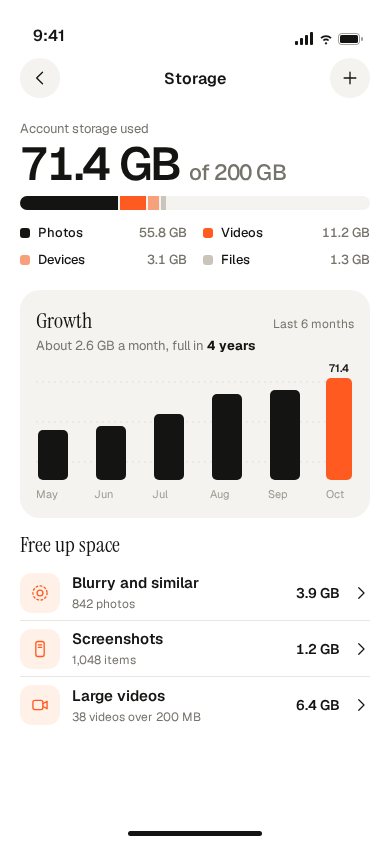
Roll is a complete photo library app: welcome, choosing what to back up, sign in, a library grid grouped by day, a photo viewer with its details, an editor, search by people, places and things, results, a person's photos, albums and an album, a memory story, a new album, sharing a link, shared albums and a partner library, live backup progress, storage and a clean up review, ordering prints with confirmation, a storage plan, activity, account and settings. White and warm grey with near black ink and a persimmon accent.
| Detail | Value |
|---|---|
| Screen type | Dashboard |
| App | Roll: Photo library and backups |
| Category | Lifestyle |
| Design language | Minimal, light |
| Type | Instrument Serif for headings, Geist for text |
| Colours | #ffffff background, #f4f3ef surface, #141413 text, #76736b text-muted, #ff5a1f accent, #fff0e8 accent-soft, #e9e7e1 border, #1f9d5c success, #e5383b danger |
What this screen says
- Storage
- Account storage used
- 71.4 GB of 200 GB
- Photos55.8 GB
- Videos11.2 GB
- Devices3.1 GB
- Files1.3 GB
- Growth
- Last 6 months
- About 2.6 GB a month, full in 4 years
- Free up space
- Blurry and similar842 photos
- 3.9 GB
- Screenshots1,048 items
- 1.2 GB
- Large videos38 videos over 200 MB
- 6.4 GB
Around it in Roll
More dashboard and stats screens
- Gavel My bids: Live online auctions
- Tidy Home stats: Book home cleaners
- Dorm Compare: Find student housing
- Hem Measurements: Tailoring and alterations, collected
- Lendly Credits: Borrow things from neighbours
- Stub Selling: Fan to fan ticket resale
- Trove Stats: Visual ideas and boards
- Vidi Studio: Video platform for creators
- Splice Cloud: Video editor for short clips
- Blush Club: Beauty and makeup shopping
- Flatpack Rewards: Furniture store with room previews
- Column Studio: Newsletters and independent writers
Every lifestyle app dashboard screen
What makes a good dashboard screen
- One headline number. The figure that matters most, like balance, steps or revenue, large at the top with its change since the last period.
- Give numbers context. Compared with last week, against a goal or as a trend line. A number alone does not say if it is good.
- Pick simple charts. Bars for comparing periods, lines for trends and rings for progress toward a goal. Avoid charts that need a legend to read.
- Let people change the period. Day, week, month and year as a segmented control above the chart.
The full dashboard screen guide and every example
Remix Roll free: describe your own app and it is drawn in this design. Or get its files from $10: Figma, React Native, SwiftUI, Flutter and HTML.