Templates · Success and confirmation screens · Lifestyle app · Grain
Grain Exported screen
A success screen from Grain, a camera and photo editor app template in a Dark-first style. Screen 17 of 25.
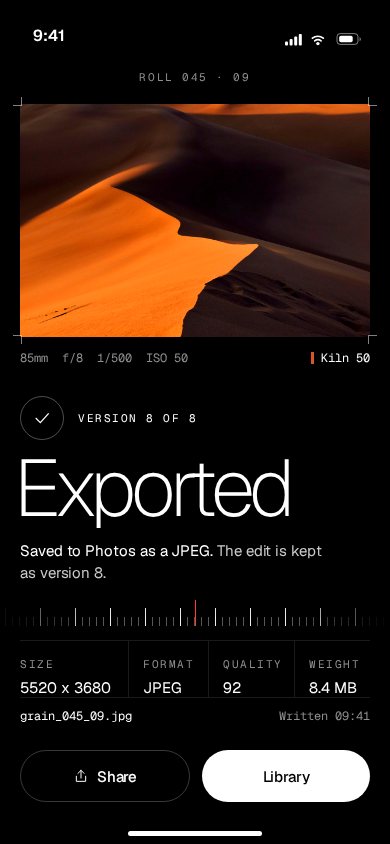
Grain is a complete camera and photo editor: welcome and sign in, a library kept as rolls and contact sheets, albums, a manual camera with level, peaking and an exposure dial, a photo viewer with EXIF, histogram and a drawn map, editing for light, colour, curves, crop and masks, a browser of six invented film stocks with their characteristic curves, compare, versions, export and a success screen, a community feed with photographer profiles and search, a year of shooting stats, a Pro plan, notifications, profile and settings.
| Detail | Value |
|---|---|
| Screen type | Success |
| App | Grain: Camera and photo editor |
| Category | Lifestyle |
| Design language | Dark-first, dark |
| Type | Geist |
| Colours | #000000 background, #161616 surface, #ffffff text, #8f8f8f text-muted, #ffffff accent, #000000 accent-contrast, #5c5c5c secondary, #262626 border, #ff3b30 danger |
What this screen says
- Roll 045 · 09
- 85mm f/8 1/500 ISO 50 Kiln 50
- Version 8 of 8
- Exported
- Saved to Photos as a JPEG. The edit is kept as version 8.
- Size 5520 x 3680
- Format JPEG
- Quality 92
- Weight 8.4 MB
- grain_045_09.jpgWritten 09:41
- Share
- Library
Around it in Grain
More success and confirmation screens
- Specs Order placed: Glasses with virtual try-on
- Circuit Order placed: Electronics store with trade-in and repairs
- Provenance Order placed: Authenticated luxury resale
- Gavel Bid placed: Live online auctions
- Tidy Booked: Book home cleaners
- Dorm Booked: Find student housing
- Hem Booked: Tailoring and alterations, collected
- Lendly Request sent: Borrow things from neighbours
- Stub Bought: Fan to fan ticket resale
- Trove Posted: Visual ideas and boards
- Vidi Published: Video platform for creators
- Roll Order placed: Photo library and backups
Every lifestyle app success screen
What makes a good confirmation screen
- Confirm in the headline. "Payment sent", "Table booked for Friday at 8" or "Lesson complete" in plain words, with a clear success colour or icon.
- Repeat the key details. Amount, date, reference number or score, so people do not need to check elsewhere that the right thing happened.
- Say what happens next. When the order arrives, when the money lands, when the next lesson unlocks.
- Offer the next step. Track the order, add to calendar, share, or start the next lesson. One primary action and a way back home.
The full confirmation screen guide and every example
Remix Grain free: describe your own app and it is drawn in this design. Or get its files from $10: Figma, React Native, SwiftUI, Flutter and HTML.